Prompt templates and few-shot composition
- Source
- From the RAG & Agents Engineering course
- By
- Sourav Banerjee
- Last updated
- 9 Nov 2026
Prompt templates
What you'll learn
- Explain a prompt template as a function from variables to a
PromptValue.- Build the Larkspur answer prompt from a system message, a history placeholder and a human message.
- Diagnose the two template mistakes that raise and the two that pass silently.
- Compose templates from examples and parts, and save them as data.
Lesson 4 of T4.1 ended with the app holding a list of messages per conversation. Something still has to put the passages, the question and the format rules into that list on every call.
The first Larkspur version builds the prompt with string concatenation. It works until someone adds an example answer, {"answer": ..., "citations": [...]}, to the system text, and the next refactor swaps concatenation for a format call. The prompt now fails on a key named "answer", and the error points at the wrong line.
A prompt template is a function from named variables to a prompt. Its {slots} are filled with Python's str.format syntax, and it comes in two kinds:
| Class | Produces | Use with |
|---|---|---|
PromptTemplate |
a StringPromptValue: one string |
completion models, or one human message |
ChatPromptTemplate |
a ChatPromptValue: a list of role-tagged messages |
chat models, and anything with a system prompt or history |
Table 1: The two template classes.
Both work with a chat model, because a string becomes one HumanMessage (lesson 4 of T4.1). ChatPromptTemplate.from_template("Explain {topic}") is exactly from_messages([("human", "Explain {topic}")]); we ran the notebook's comparison and the two produce the same messages. Use from_messages whenever there is a system prompt.
Three calls fill a template:
| Call | Takes | Returns |
|---|---|---|
.format() |
keyword arguments | a plain string |
.format_prompt() |
keyword arguments | a PromptValue |
.invoke() |
a dict | a PromptValue; this is the call an LCEL chain makes for you |
Table 2: Three ways to fill a template, from notebook 05a.
The Larkspur answer prompt
The answer prompt has three messages: a system message with the rules and a {format_instructions} slot for the parser's text, a MessagesPlaceholder named history for the conversation so far, and a human message with {passages} and {question}. Slots fill at two different times:


Figure 1: .partial() fills a slot once when the chain is built; the rest arrive with every call.
We built that template with langchain-core 1.7.0 and printed its variables:
| Template | input_variables |
|---|---|
| as built | format_instructions, history, passages, question |
after .partial(format_instructions=...) |
history, passages, question |
Table 3: The answer prompt's slots before and after .partial().
.partial() fills a slot once, so callers never pass it. MessagesPlaceholder takes a whole list of messages at call time, which is where the history from lesson 4 of T4.1 goes.
Planted failures: four template mistakes
Two of these mistakes raise and two pass without a word. We planted each one on the course environment:
| Mistake | What happens |
|---|---|
A typo in the input_variables you pass (output_langauge) |
The list is recomputed from the template text and the typo disappears. Only validate_template=True raises, with a Pydantic validation error. |
| A variable left out at format time | KeyError names it ('output_language'). This one is loud. |
Literal JSON braces in a template, {"answer": ...} |
"answer" becomes a variable, and formatting raises KeyError('"answer"'). Double the braces: {{"answer": ...}}. |
.partial() for a slot the template does not have |
Ignored without an error: input_variables is unchanged and the value never reaches the model. Lesson 6 of T4.1 finds this in a course notebook. |
Table 4: Four template mistakes and what langchain-core 1.7.0 does with each.
We call the quiet pair the silent slot: a value you meant to send, or a check you meant to run, that LangChain drops without telling you. Printing input_variables and the formatted messages once, before the first model call, catches both. The opening refactor bug is the third row: double the braces in any example JSON.
Few-shot and composition
Examples in the prompt steer both the answer and its format. The optional notebook 05b first writes nine labelled restaurant reviews (three restaurants, three sentiments each) straight into one template string, with every JSON brace doubled. The few-shot classes keep examples as data instead:
FewShotPromptTemplate: formats a list of example dicts with anexample_promptand adds asuffixholding the real input. Adding an example is appending a dict.FewShotChatMessagePromptTemplate: turns each example into a human message and an AI reply, and slots the block into aChatPromptTemplatebetween the system prompt and the question. Lesson 7 of T4.1's optional template notebook builds one.
For Larkspur, one or two examples of a question, its passages and the exact JSON answer show the model the citation format better than a description of it. In the chat version, the block sits here:
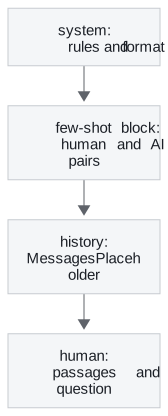
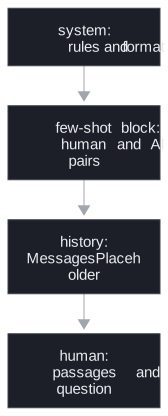
Figure 2: The message order of a few-shot answer prompt. Examples come before the real conversation.
The notebook also writes the examples as chain-of-thought pairs, where each example shows the reasoning before the JSON answer.
Composing templates
Templates compose with +. Adding two PromptTemplate objects concatenates the text and merges the variables. We ran it: a passages part plus a question part gives one PromptTemplate with passages and question. ChatPromptTemplate objects add the same way, message list to message list. The notebook builds its sentiment prompt from three parts (an introduction, a worked example and the request) and gets one template with 6 variables; .partial() on the five example slots leaves only input.
PipelinePromptTemplate, the 0.x class for this, is in neither langchain-core 1.7.0 nor langchain-classic. The one thing + does not do is place a part into a named slot of a larger template; for that, fill a final template with the formatted parts yourself.
Saving templates
A template is data, so it can be versioned like code. In 1.x, dumps and loads from langchain_core.load save and restore it as JSON:
| Step | What we saw on the course environment |
|---|---|
dumps on the joke template |
235 characters with the keys lc, type, id, kwargs and name |
loads with allowed_objects=[PromptTemplate] |
a PromptTemplate back, and a warning that loads is in beta |
loads without allowed_objects |
a warning that the default will change, asking for an explicit list |
the older .save() |
still runs, with a warning that it was deprecated in langchain-core 1.2.21 and will be removed in 2.0.0 |
Table 5: Serialising a template in langchain-core 1.7.0.
allowed_objects is a security boundary. Deserialising rebuilds objects from the file's contents, and you name the classes you trust.
In practice: the answer prompt
For Larkspur, the prompt comes together in this order:
- Write the system rules as a
ChatPromptTemplatemessage, with{format_instructions}as a slot and every literal brace doubled. - Add one or two worked examples as a few-shot block.
- Add a
historyplaceholder and a human message with{passages}and{question}. - Fill
format_instructionswith.partial(), then printinput_variablesand one formatted prompt. - Save the template with
dumpsnext to the code, where a prompt change shows up in review.
Key distinction: a loud mistake stops the first request; a silent slot ships. Print the formatted prompt once, before any model sees it.
Lesson 6 of T4.1 fills that {format_instructions} slot from an output parser.
Run the notebooks
The code for this lesson is in these notebooks. Colab runs one in your browser: install the packages its first cell imports and set the API keys it reads. To run every notebook as written, clone the repository and use its uv environment.
| Notebook | GitHub | Colab |
|---|---|---|
| Prompt Templates | Open on GitHub | Open in Colab |
| Few Shot Composition and Serialisation (optional) | Open on GitHub | Open in Colab |
Key Takeaways
- Use
ChatPromptTemplate.from_messageswhenever there is a system prompt or history. Fill fixed slots once with.partial()and pass history through aMessagesPlaceholder. - Double literal JSON braces in templates, and print
input_variablesand the formatted messages once before the first call, since a typo or an unused partial fails silently. - Keep few-shot examples as data in a few-shot template, compose templates with
+, and save them withdumpsandloads, naming the classes you trust.
Check yourself
1. In the Larkspur answer prompt, why do the input variables drop from four names to three after calling partial for the format instructions?
.partial() fills the format_instructions slot once, at build time, so callers never pass it. What remains is history, passages and question; history is a MessagesPlaceholder that takes a whole message list at call time.
2. You want the model to return Larkspur answers in an exact JSON citation format. Should you describe the format or show it, and what must you watch for?
Show it. One or two examples of a question, its passages and the exact JSON answer show the citation format better than a description; FewShotChatMessagePromptTemplate adds each as a human message and an AI reply. Examples written inside a template string need their braces doubled, or "answer" becomes a variable and formatting raises KeyError.
3. Two of the four template mistakes pass without an error. Which two, and how do you catch them?
A typo in the input_variables you pass, which is recomputed from the template text unless validate_template=True, and .partial() for a slot the template does not have, which is ignored. Printing input_variables and the formatted messages once, before the first model call, catches both.