LangChain introduction and the 1.x package split
- Source
- From the RAG & Agents Engineering course
- By
- Sourav Banerjee
- Last updated
- 9 Nov 2026
The 1.x package split
What you'll learn
- Explain why LangChain 1.0 split one package into four kinds of package.
- Name the package that holds each part of a chain: template, model and parser.
- Diagnose an old import from its exception class alone.
- Choose between moving an old class and replacing it.
T2.2 called the provider SDKs directly, and T3.1 and T3.2 wrote the prompts those calls send. This module wraps both in LangChain, the framework most notebooks in this course are written in.
The Larkspur Cloud support assistant has a script from an older LangChain tutorial. It imports LLMChain from langchain.chains, HumanMessage from langchain.schema and the prompt hub from langchain. On the course environment (langchain 1.4.7, langchain-core 1.7.0) the script stops on its first line. The old path has no shim that forwards it and no warning that names the new one.
The reason is a change in where code lives. Through the 0.x releases, the langchain package held the whole ecosystem: chains, agents, memory, retrievers, every provider integration and the prompt hub. Installing it pulled in all of that, and a break in any one integration could break the import. Version 1.0 split the surface by how fast each part changes and who owns it:
| Package | Holds | Changes |
|---|---|---|
langchain-core |
messages, documents, prompts, output parsers, Runnable |
rarely, deliberately |
langchain |
the agent loop and short re-exports such as init_chat_model |
with the agent API |
langchain-openai, langchain-groq, … |
one provider each | at that provider's pace |
langchain-classic |
retired chains, retrievers, indexing, the hub | frozen |
Table 1: The four kinds of package in LangChain 1.x.
Every other package builds on langchain-core:
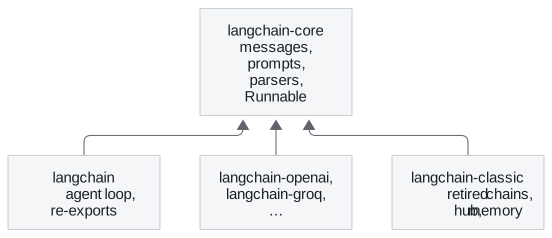
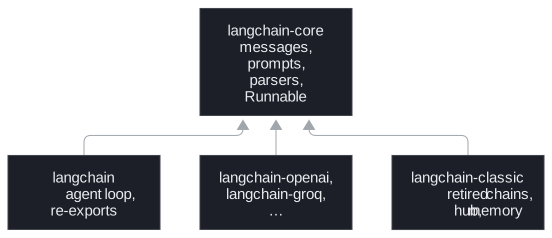
Figure 1: The dependency direction. A partner package can change at its provider's pace without touching the base types.
The three parts of every chain
The first notebook already shows the shape every later chain keeps: a template, a model and a parser joined with LCEL's |. The notebook then grows it into a pipeline of three chains (details, then a one-sentence summary, then the summary's sentiment), each fed by the one before. Each of the three parts comes from a known package:


Figure 2: One chain, two sources. Only the model comes from outside langchain-core.
The model class comes from a partner package (langchain_openai.ChatOpenAI), or from init_chat_model in langchain when the provider is named in a string. Everything else in this module, the template classes, the message classes and all four output parsers, imports from langchain-core. T4.2 covers the pipe itself, and lessons 2 to 7 of T4.1 cover the three parts. Knowing where each class lives is half of a migration. The other half is reading the error when an old path fails.
Reading an import error
Old code fails on 1.x in two different ways, and the exception class says what moved. We ran the notebook's import audit and the hub import on the course environment:
| Old import | Error on 1.x | Fix |
|---|---|---|
langchain.chains |
ModuleNotFoundError |
langchain_classic.chains, or rewrite as an LCEL chain (T4.2) |
langchain.schema |
ModuleNotFoundError |
langchain_core.messages, .documents or .output_parsers |
langchain.text_splitter |
ModuleNotFoundError |
langchain_text_splitters |
langchain.memory |
ModuleNotFoundError |
langchain_classic.memory, or better a checkpointer (below) |
langchain.llms |
ModuleNotFoundError |
the provider's partner package |
langchain.retrievers, langchain.indexes |
ModuleNotFoundError |
langchain_classic |
from langchain import hub |
ImportError: cannot import name 'hub' |
langchain_classic |
Table 2: The seven 0.x module paths the notebook audits, plus the hub. All seven raise ModuleNotFoundError; only the hub raises ImportError.
ModuleNotFoundError means the module is gone. ImportError means the package still exists and no longer exports the name. A third message looks similar and means something else: No module named 'langchain_classic' says the replacement package is not installed in this environment. Listing it in a requirements file is not the same as installing it. Declare it in the project's dependencies and sync.
Read the three messages in order:
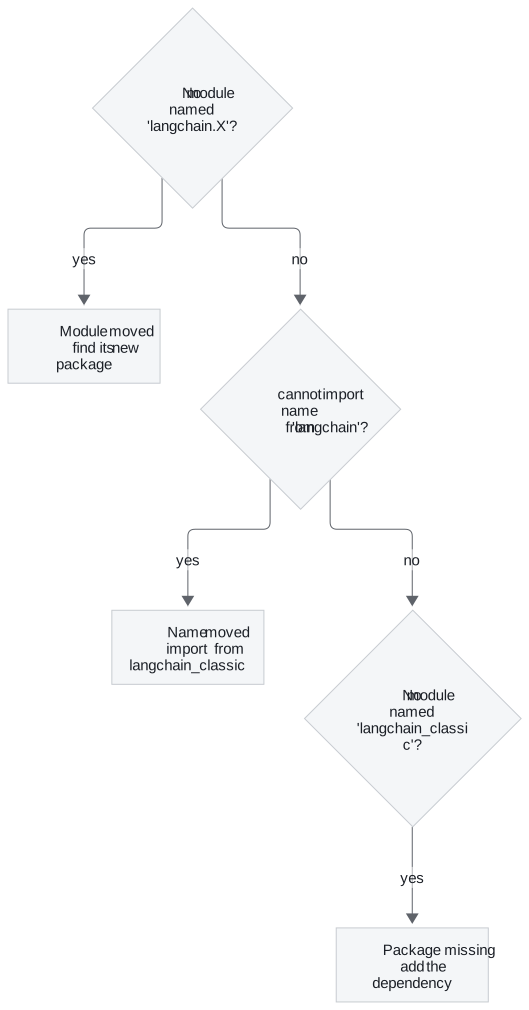
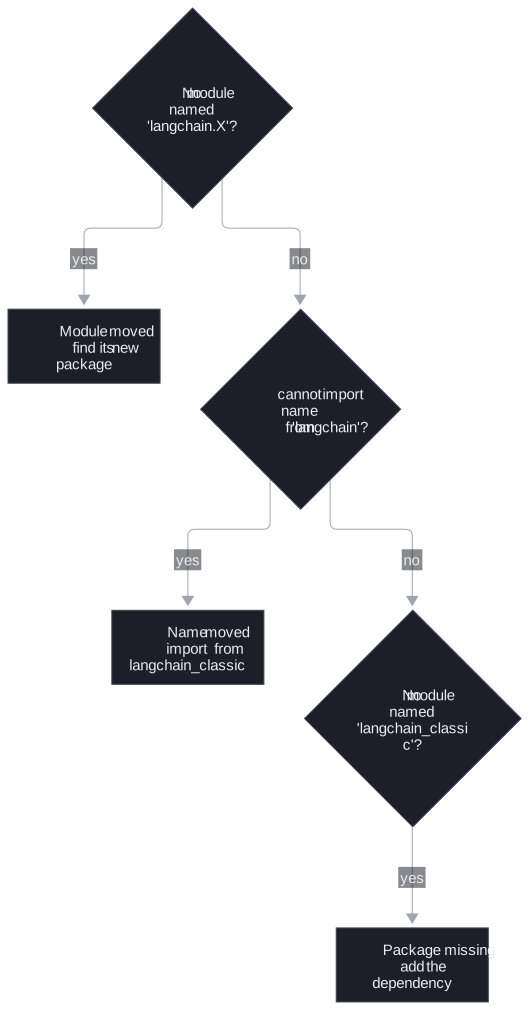
Figure 3: Diagnosing an old import. Each "no" moves one question down.
The short paths that langchain keeps are aliases, not copies. langchain.messages.HumanMessage is langchain_core.messages.HumanMessage returns True on the course environment. The notebook reads a False as two LangChain installs on sys.path, a broken environment that no import change will fix.
Moved is not recommended
Memory is the one place where the moved class is the wrong answer. ConversationBufferMemory still imports from langchain_classic.memory, and the old app would run again after a one-line change. The 1.x replacement is a LangGraph checkpointer with a thread_id (T4.4, T10.1), which stores each conversation outside the process. We call the shortcut the moved-class migration: the import works, and the design it carries is the one 1.x retired. Retired chains are a milder case of the same thing. langchain_classic.chains still runs them, and T4.2 rewrites them as LCEL.
In practice: the refund script
For the Larkspur script, the error classes give the order of work:
ModuleNotFoundErroronlangchain.schema: importHumanMessagefromlangchain_core.messages.ModuleNotFoundErroronlangchain.chains: rewriteLLMChainas template, model and parser joined with|, which needs no classic package.ImportErroronhub: import it fromlangchain_classic, and add that package to the project's dependencies if the next error says it is missing.- Any conversation memory: move it to a checkpointer, not to
langchain_classic.memory.
Key distinction: a
ModuleNotFoundErrornames a path, anImportErrornames a symbol. Fix the path for the first and the import source for the second.
Lesson 2 of T4.1 takes the middle part of Figure 2, the chat model, and shows what stays the same when its provider changes.
Run the notebooks
The code for this lesson is in these notebooks. Colab runs one in your browser: install the packages its first cell imports and set the API keys it reads. To run every notebook as written, clone the repository and use its uv environment.
| Notebook | GitHub | Colab |
|---|---|---|
| LangChain Introduction | Open on GitHub | Open in Colab |
| Package Split and Imports LangChain v1 | Open on GitHub | Open in Colab |
Key Takeaways
- Version 1.0 split LangChain by pace of change. Prompts, messages, parsers and
Runnablelive inlangchain-core, each provider in its own package, and retired chains and the hub in the frozenlangchain-classic. - Read the exception class.
ModuleNotFoundErrormeans the module moved,ImportErrormeans the package no longer exports the name, and a missinglangchain_classicmeans it is not installed. - Not every old class should simply move. Replace conversation memory with a LangGraph checkpointer and a
thread_id, and rewrite retired chains in LCEL.
Check yourself
1. Why did version 1.0 split the single langchain package into several packages?
In 0.x, installing langchain pulled in every provider integration, and a break in any one of them could break the import. Version 1.0 split the surface by how fast each part changes and who owns it: langchain-core changes rarely, each partner package moves at its provider's pace, and langchain-classic is frozen.
2. Old code runs from langchain import hub on 1.x. Which error do you expect, and where should hub come from now?
ImportError: cannot import name 'hub' from 'langchain'. The package still exists but no longer exports the name, so import it from langchain_classic. Compare langchain.chains, where the module itself is gone and the error is ModuleNotFoundError.
3. A 0.x app keeps chat history in ConversationBufferMemory. Is changing its import path the right migration?
It runs, but it is not the recommended answer. The class still imports from langchain_classic.memory; the 1.x replacement is a LangGraph checkpointer with a thread_id (T4.4, T10.1). Memory is the one place where moving the import is not the fix.