Input/output schemas and configuration
- Source
- From the RAG & Agents Engineering course
- By
- Sourav Banerjee
- Last updated
- 9 Nov 2026
Every caller sees the counter
What you'll learn
- Explain how one overall state can show callers a narrower input and output.
- Trace what crosses the boundary with one schema and with three.
- Diagnose a leaked internal key and an unchecked output.
- Choose between state, config and runtime context for each value a node needs.
Lesson 4 of T4.3 gave classify a route reason in state and a database client in runtime context. Every key in state still goes back to whoever called the graph.
Here is what that costs. The Larkspur widget receives the whole final state: the messages, route, the route reason and a counter of model calls. A widget developer starts reading route to choose an icon. Months later the graph team renames route during a refactor, no test in the graph fails, and the widget breaks in production. The key was never meant for callers, and nothing said so.
The one-line reason: with one schema, the state is the graph's public interface. This page separates the two, then sorts the values a node needs into state, config and context.
Input, output and private state
An input schema and an output schema are narrower views of the state: the caller may send only the input schema's keys and receives only the output schema's keys, while nodes keep reading and writing the whole state. The advanced state notebook starts from one schema with question, answer and llm_calls, a counter the node bumps on each model call. It then splits that state into four schemas:
| Schema | Keys | Who sees it |
|---|---|---|
| Input | question |
the caller, on the way in |
| Private | llm_calls |
nodes only |
| Output | answer |
the caller, on the way out |
| Overall | all three, by inheriting from the other three | every node |
Table 1: The four schemas of the split graph. The graph is built on the overall schema and given the input and output schemas as well.
What crosses the boundary:


Figure 1: The caller's view of the split graph. The nodes in the middle still see every key.
We reran both builds on LangGraph 1.2.18 with a stub in place of the model, which answers the notebook's mountain question with a fixed string:
| Build | Sent | Returned |
|---|---|---|
| One schema | question |
question, answer, llm_calls (1) |
| Split schemas | question |
answer only |
Table 2: The same node under one schema and under split schemas.
The node did not change. In the notebook it even sets the counter and the answer on the state it received and returns that whole state. The output schema still lets only answer out.
Planted failures at the boundary
We planted two cases on the split graph:
| Planted case | What happened | What it means |
|---|---|---|
Caller also sends llm_calls as 7 |
the node sees no llm_calls at all |
the input schema drops keys it does not name |
Node writes the number 5 as answer |
the caller receives 5, no error | unchecked output |
Table 3: Two planted cases on the split graph (LangGraph 1.2.18).
The first row is a guard working: a caller cannot set private keys. The second is the unchecked write from lesson 3 of T4.3, now at the exit. A TypedDict output schema filters keys and checks no types. Type checks come from a Pydantic state schema, and they cover the input only.
For the Larkspur support graph, the input is the question and the output is the structured answer (route, source, text). The message history, the route reason and the top-level route key stay private. That is what lets the team rename or add internal keys without breaking the widget: the leaked key from the opening never leaves the graph.
Config, context or state
Some values a node needs are not data the graph works on. In the advanced state notebook, the model node reads a language setting from config["configurable"], falling back to English, and puts it in a system message. The notebook asks the same mountain question in Spanish, then in German, from one compiled graph. We confirmed the plumbing with a stub: language reaches the node, defaults to English when the config has none, and never appears in the returned state.
Config holds per-call settings; runtime context holds dependencies; state holds the data the graph reads and changes. Each place has one job:
| Place | Holds | Returned? |
|---|---|---|
| State | data the graph reads and changes | yes, through the output schema |
config["configurable"] |
per-call settings: language, thread_id |
no |
| Runtime context | dependencies: clients, the caller's identity | no |
Table 4: The three places a node's inputs can live.
Two questions sort any value:
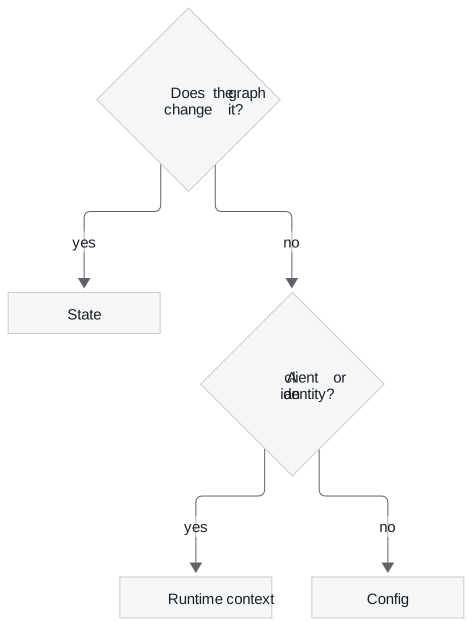
Figure 2: Where a value belongs.
Putting a client or a secret in state is the usual mistake, and we call it state as a junk drawer. State is returned to the caller. Once T4.4 adds a checkpointer, state is also saved after every step, and a secret in it is written to storage on every turn. The thread_id in config is what that checkpointer uses to find a conversation's saved state.
In practice: the widget contract
The Larkspur support graph, with every value in its place:
- The widget sends the question, which the input schema admits, plus a config with the reply language and the conversation's
thread_id. - The server adds the customer id and the database client as runtime context. The widget never sees either.
- The nodes run on the full state: messages,
route, the route reason, the answer. - The widget receives only the structured answer. A refactor that renames
routechanges nothing it can see.
That completes the boundary of one run. T4.4 makes runs remember each other, using the thread_id this page placed in config.
Run the notebooks
The code for this lesson is in these notebooks. Colab runs one in your browser: install the packages its first cell imports and set the API keys it reads. To run every notebook as written, clone the repository and use its uv environment.
| Notebook | GitHub | Colab |
|---|---|---|
| Advanced State | Open on GitHub | Open in Colab |
Key Takeaways
- Give a graph separate input, private and output schemas, so callers send only the question and receive only the answer. Internal keys can then change without breaking callers.
- A
TypedDictoutput schema filters keys but checks no types. Type checks come from a Pydantic state schema and cover input only. - Put data the graph changes in state, per-call settings such as language and
thread_idin config, and clients and identity in runtime context. Never put a client or secret in state.
Check yourself
1. Why split a graph's state into input, private and output schemas when the nodes still read and write every key?
Because only what crosses the boundary changes. The caller sends the question and gets the answer, and bookkeeping such as llm_calls stays private, where no caller can depend on it or set it. For Larkspur, that leaves room to rename or add internal keys without breaking the web widget.
2. The Larkspur graph needs a reply language, a thread id, a customer id and a database client. Where does each one go?
The reply language and the thread_id go in config["configurable"], as per-call settings. The customer id and the database client go in runtime context, as dependencies. Neither place is returned; state holds only the question, the route and the answer the graph works on.
3. A teammate puts the database client and a secret in state. Why is that a mistake, and why does it get worse once a checkpointer is added?
State is returned to the caller, and the client and the secret leave the graph with the answer. Once T4.4 adds a checkpointer, state is also saved after every step, and the secret is written to storage on every turn. Dependencies and secrets belong in runtime context, which is never returned.