Research assistant with MCP and LangGraph
- Source
- From the RAG & Agents Engineering course
- By
- Sourav Banerjee
- Last updated
- 9 Nov 2026
MCP + LangGraph
Larkspur's research assistant keeps conversation in its graph and research files on a server. You will separate those memories, inspect the MCP tool loop and count repeated startup and discovery under three session lifetimes.
Step 1: Connect the graph to server-owned tools
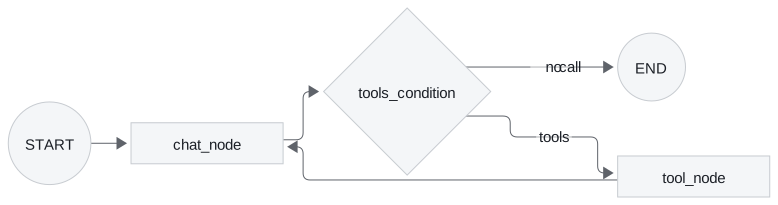
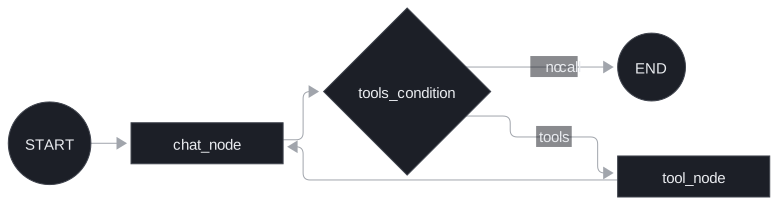
The research assistant splits into a graph that thinks and servers that act. client.py builds the graph; two MCP servers supply every tool it can call:
research_server(this project'sserver.py) keeps research in Chroma, one database per topic underresearch_chroma_dbs/<topic>/. Its five tools:save_research_data(content, topic),search_research_data(query, topic, max_results=5),list_research_topics(),get_topic_info(topic)anddelete_research_topic(topic). Saving skips any text whose MD5 hash is already in the topic'scontent_hashes.json.firecrawl_serveris the publishedfirecrawl-mcppackage, started withnpx -y, which scrapes the web. The client copiesFIRECRAWL_API_KEYfrom its environment into that server'senvbefore it connects.
Step 2: Keep the model and execution loop distinct
MCP only changes where the tools come from. MultiServerMCPClient(mcp_json).get_tools() turns every tool of both servers into a LangChain tool; llm.bind_tools(tools) shows them to Ollama's qwen3; ToolNode(tools=tools) runs whichever the model picks; tools_condition routes. A system prompt tells the model to search saved research before crawling and to save what it finds.
Step 3: Locate conversation and research persistence
The assistant has two memories, held in different processes. The client's MemorySaver keeps the conversation for the thread research_session and loses it when client.py exits. The research server keeps findings in Chroma on disk, across sessions and for any host that connects, Claude Desktop included (it is the research_server entry in the 40.2 config).
Two fixes before it runs here: client.py imports ChatPromptTemplate and MessagesPlaceholder from langchain.prompts, which raises ModuleNotFoundError under langchain 1.4.7 (they live in langchain_core.prompts); and topic names become directory names unchecked, which lesson 7 of T12.3 shows is dangerous once the server is shared.
How long a session lives
Step 1: Count discovery and process startup separately
MultiServerMCPClient.get_tools() returns tools with no open connection behind them. Its docstring in langchain-mcp-adapters 0.3.2 says: "A new session will be created for each tool call". For a stdio server, a new session is a new process.
- chat_node calls the model, which replies with a tool call for retrieve.
- tools_condition sees the tool call and routes to tool_node.
- The tool came from get_tools(), so it opens a new session: a new server process.
- initialize, its result and the initialized notification: 3 messages.
- tools/call and its result: 2 messages.
- The new session has no output schema for retrieve, so ClientSession sends tools/list before it checks the result: 2 more.
- The session closes and the process exits: 7 messages and 2,071 bytes for one call. A held session sends only the 2 call messages.
- The result goes back to chat_node as a ToolMessage, and the next call starts another process.
Step 2: Explain discovery after a call
The tools/list after the call comes from the SDK. mcp 1.30.0's ClientSession validates each structured tool result against the tool's output schema, and a session that has not listed its tools yet lists them first. A held session pays for that once; a session per call pays for it every time.
Step 3: Compare process and message counts
The interactive lab records the real JSON-RPC traffic of the Larkspur handbook server under three client patterns, with a scripted model so every run makes the same calls. Its numbers:
| Questions × calls per question | Hold one session | Session per question (06 app.py) |
Session per tool call (07 client) |
|---|---|---|---|
| 1 × 1 | 1 start, 7 messages | 1 start, 7 messages | 2 starts, 12 messages |
| 3 × 2 | 1 start, 17 messages | 3 starts, 27 messages | 7 starts, 47 messages |
| 3 × 3 | 1 start, 23 messages, 9,963 bytes | 3 starts, 33 messages, 12,131 bytes | 10 starts, 68 messages, 19,726 bytes |
Step 4: Choose a session lifetime deliberately
Each pattern has a reason to exist:
- Hold one session for a conversation:
async with client.session("research_server") as session:thentools = await load_mcp_tools(session). One process, one handshake, server-side state kept in memory for as long as the session lives. - Session per question isolates questions from each other and suits a request handler such as Streamlit's, at the price of one start per question.
- Session per tool call needs no lifecycle code, which is why
get_tools()is the quickstart, and it is the costliest. The lab counts messages; on a real server each start also pays for the work done at import time. The research server builds its Ollama embeddings client at every start, andnpx -y firecrawl-mcpstarts Node for every crawl.
Message counts are not latency, and the lab does not time anything, because start-up cost depends on the machine and the server. Measure your own: log one line on the server's stderr at start-up and count the lines per conversation.
Try it yourself
Use three questions with two calls each in the lab. Compare a held session, one per question and one per tool call, then inspect when tools/list repeats. Check process starts and JSON-RPC messages separately from latency. The lab records traffic, not startup time on your deployment machine.
Practice notebook
Run the complete implementation from the practice material after checking the trace or calculation above. Use its stated environment for live model or server calls; recorded model choices and timings are observations, not guaranteed outputs.
Continue learning
Run the notebooks
The code for this lesson is in these notebooks. Colab runs one in your browser: install the packages its first cell imports and set the API keys it reads. To run every notebook as written, clone the repository and use its uv environment.
| Notebook | GitHub | Colab |
|---|---|---|
| Research assistant with MCP and LangGraph | Open on GitHub | Run locally |
Key Takeaways
- MCP changes only where the tools come from. The LangGraph tool loop stays the same, with the graph thinking and the servers acting.
- Conversation memory lives in the client's checkpointer and ends with the process; research saved by the server persists on disk for every host that connects.
- Hold one session for a conversation. A session per tool call needs no lifecycle code but restarts the server on every call, so measure start-ups with one stderr line.
Check yourself
1. The research assistant has two memories. Where does each live, and how long does it last?
The client's MemorySaver keeps the conversation for the thread research_session and loses it when client.py exits. The research server keeps findings in Chroma on disk, across sessions and for any host that connects, Claude Desktop included.
2. For 3 questions with 3 tool calls each, what does the lab record for holding one session versus a session per tool call?
Holding one session: 1 start, 23 messages, 9,963 bytes. A session per tool call, as in the 07 client: 10 starts, 68 messages, 19,726 bytes. A session per question sits between, at 3 starts, 33 messages and 12,131 bytes.
3. You turn the research assistant into a chat that holds long conversations. Which session pattern should the client use, and why not the get_tools default?
Hold one session per conversation: async with client.session("research_server") as session: then load_mcp_tools(session), for one process and one handshake. The get_tools() default opens a session per tool call, the costliest pattern: every start rebuilds the Ollama embeddings client, and npx -y firecrawl-mcp starts Node for every crawl. Log one stderr line at server start-up to count the starts.