LangGraph threads, checkpoints and memory optimisations
- Source
- From the RAG & Agents Engineering course
- By
- Sourav Banerjee
- Last updated
- 9 Nov 2026
Forget it, but keep the log
What you'll learn
- Explain how a checkpointer and a
thread_idgive a LangGraph graph per-conversation memory.- Trace the checkpoints a turn writes and the messages four memory strategies send on a six-turn ticket.
- Compare deleting old messages from state with hiding them from the model.
- Diagnose a running summary that resets itself every turn.
Lessons 2 to 4 of T10.1 kept history with RunnableWithMessageHistory, which is deprecated. LangGraph keeps the conversation in the graph's own state instead, and the bounding choices of lesson 3 of T10.1 become nodes.
A Larkspur customer opens a ticket about a duplicate charge. Six turns later the prompt has grown on every call, and the team wants it bounded. Support leads also want the whole ticket available for review and for replaying a bad answer. A bound that deletes old turns satisfies the first request and silently breaks the second.
This page first shows where a LangGraph conversation lives, then measures four strategies on one ticket and separates the two things a bound can cut: what the model reads and what the thread stores.
Checkpointer / thread_id
A LangGraph graph keeps the conversation in its state, typically a messages channel with the add_messages reducer: each node returns only its new messages, and the reducer appends them. A checkpointer saves a snapshot of that state, a checkpoint, after every step, and the thread_id in the call's config names the sequence of checkpoints a run reads and extends. Compile the graph with a checkpointer once; every call then picks its conversation by thread:
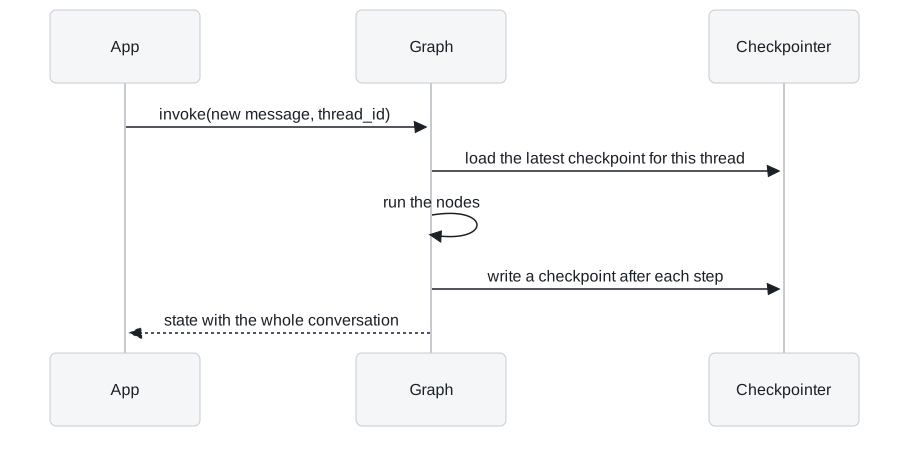
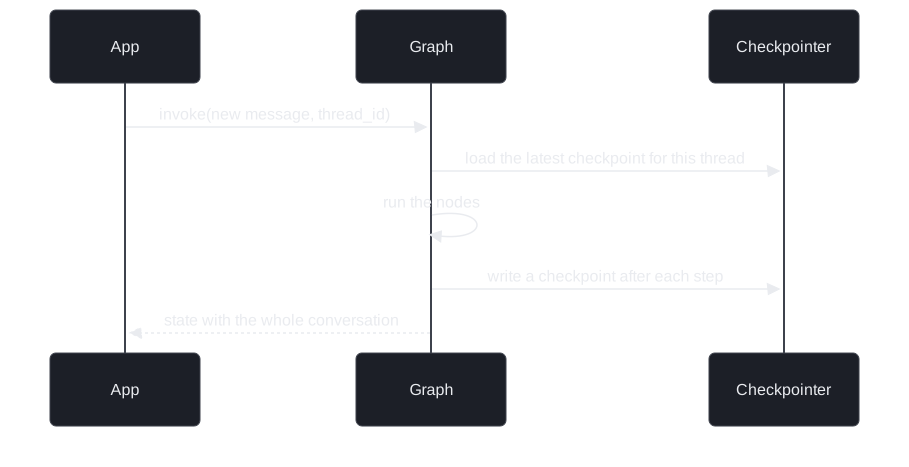
Figure 1: One turn on a checkpointed graph. The app sends only the new message; the thread supplies the rest.
This replaces RunnableWithMessageHistory and session_id from lesson 2 of T10.1, and LangChain recommends it for new code. A one-node graph that answers every message with a fixed reply shows the isolation without a model call:
| Call | Thread | New message | Messages in the returned state |
|---|---|---|---|
| 1 | dana |
Annual plan | 2 |
| 2 | dana |
Which plan? | 4 |
| 3 | omar |
Hello | 2 |
Table 1: Three calls on one compiled graph with an in-memory checkpointer, run in the scratchpad with a scripted reply.
Call 2 returns four messages because dana's first exchange was loaded from the thread. Call 3 starts from nothing, although it uses the same graph object. The notebook shows the same thing with a model: user001 asks Explain AI in 1 line and then Do the same for ML, which only makes sense because the first turn is replayed, and user001's memory is untouched after user002 talks on another thread.
Counting checkpoints
Checkpoints are snapshots of every step, not only of the end of a turn. A turn writes one for the input, one at the start of the run and one per node step:
| Graph | Checkpoints per turn | After six turns |
|---|---|---|
| One node (answer) | 3 | 18 |
| Two nodes (bound, then answer) | 4 | 24 |
| The notebook's tool-calling agent (model, tool, model) | about 5 |
Table 2: Checkpoints written per turn, counted with a stub model in the scratchpad for the first two rows.
get_state returns the latest checkpoint; get_state_history walks all of them, newest first, which is what replay, forking and debugging use. Where they are written depends on the checkpointer:
| Checkpointer | Survives a restart | Use |
|---|---|---|
InMemorySaver |
No | Notebooks and tests |
SqliteSaver |
Yes, a plain SQLite file with checkpoints and writes tables |
One process; it is a context manager, and the graph is compiled inside its block |
PostgresSaver (langgraph-checkpoint-postgres) |
Yes | Deployments with concurrent writers |
Table 3: Three checkpointers behind the same compile call.
Two rules follow from this design. Short-term describes scope, not lifetime: a thread on SQLite or Postgres stays on disk until you delete it, which makes it customer data with retention rules like any other. And the thread_id must come from trusted server-side config, never from user text, because whoever picks the id reads that thread.
Delete or hide
A thread that keeps everything sends every earlier message on every turn. The notebook runs one six-turn support ticket through four graphs. Turn 1 reports the duplicate charge and mentions in passing that the customer's favourite colour is blue; turn 3 asks for the colour back. Counted in messages, the model receives:
| Turn | Sequential | Sliding window | Trim on read | Summary |
|---|---|---|---|---|
| 1 | 1 | 1 | 1 | 1 |
| 2 | 3 | 3 | 3 | 3 |
| 3 | 5 | 3 | 3 | summary + 1 |
| 4 | 7 | 3 | 3 | summary + 3 |
| 5 | 9 | 3 | 3 | summary + 1 |
| 6 | 11 | 3 | 3 | summary + 3 |
| Stored after turn 6 | 12 | 4 | 12 | summary + 4 |
Table 4: Messages sent to the model per turn, not counting system messages. Counted by running the notebook's four graphs with a stub model in place of gpt-4o-mini; the graph logic decides these numbers, and a real model gives the same counts with different token totals.
Sequential can answer turn 3, and so can the summary graph if its summariser kept the colour. Sliding window and trim on read cannot, since both send only the last MAX_MESSAGES = 3 messages: the previous exchange and the new question.
Same prompt, different thread
The two bounded strategies send the same prompt and differ in what they keep:
- Sliding window deletes. A truncate node returns a
RemoveMessagefor every message older than the window, and theadd_messagesreducer removes them from the checkpointed state. They are gone for every later turn, forget_stateand for anyone auditing the ticket. The reducer is the mechanism: plain list concatenation can only append. A deleting window needsadd_messages. - Trim on read hides. The model node calls
trim_messageson a copy of the list and leaves state alone. The thread still holds all 12 messages, turn 1's colour included. Trimming the prompt never trims the checkpoint: withSqliteSaverthe full thread is written to disk on every step.
Call the first one audit loss: the answer quality is identical, and the damage shows up only when someone needs the full ticket.
The summary graph
The summary graph keeps a summary string next to a buffer of recent messages. Once the buffer reaches MESSAGE_THRESHOLD = 4, a node folds all but the newest message into the summary and removes them. It folds every other turn, turns 3 and 5 in Table 4, and each fold is an extra LLM call. Counting those calls, the notebook notes that on a thread this short summarisation costs about as much as the sequential baseline; it pays off on long threads.
The summary channel has no reducer, so any value written to it replaces the old one. Pass the empty summary only on the first turn. An app that sends it on every turn wipes the memory it is building, a failure we will call the summary reset: the folds run, the logs look busy, and each turn starts from nothing.
Choosing a strategy
Figure 2 turns Table 4 into questions:
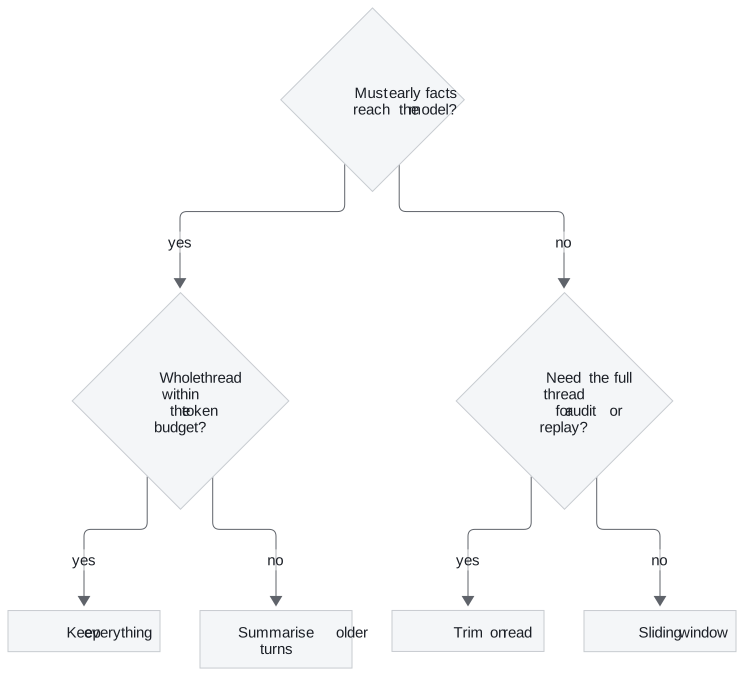
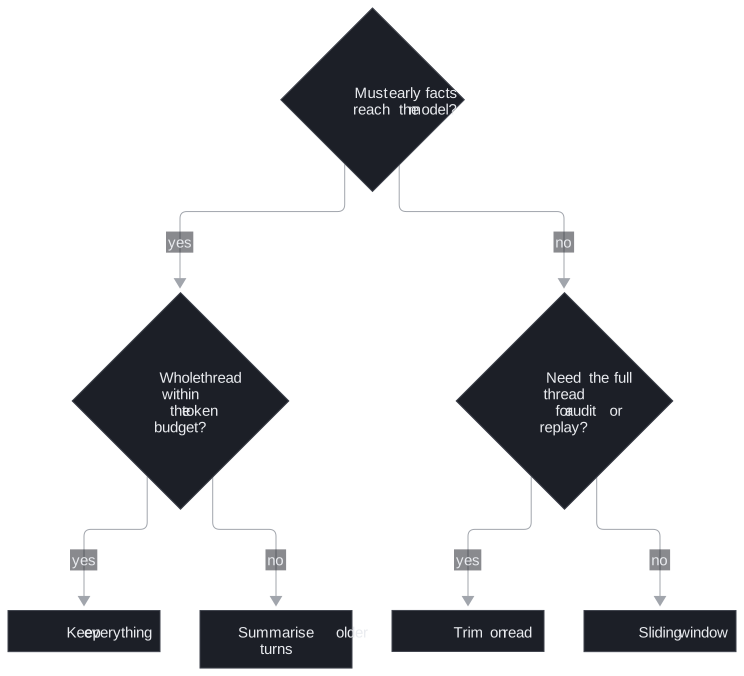
Figure 2: Choosing a memory strategy for a thread. Prefer hiding over deleting whenever someone may need the full ticket.
For agents built with create_agent, LangChain 1.x ships the summary strategy as SummarizationMiddleware.
In practice: Larkspur's duplicate-charge ticket
Applying the page to the opening ticket:
- Thread. The endpoint derives the
thread_idfrom the authenticated customer and ticket, and compiles the graph once withPostgresSaver. - Bound. Support leads need the whole ticket, which rules out the sliding window. Trim on read caps the prompt and keeps all 12 messages in the thread.
- Early facts. The billing-address change from turn 2 and the amount from turn 4 matter for the refund at the end. Long tickets switch to a summary seeded once, on the first turn.
- Retention. The thread stays in Postgres after the ticket closes and follows the same deletion rules as the rest of the customer's data.
What changes next: a thread ends with its conversation. T10.2 adds the memory a thread cannot hold: facts about a customer that should carry over to their next conversation.
Run the notebooks
The code for this lesson is in these notebooks. Colab runs one in your browser: install the packages its first cell imports and set the API keys it reads. To run every notebook as written, clone the repository and use its uv environment.
| Notebook | GitHub | Colab |
|---|---|---|
| Memory and conversational agent | Open on GitHub | Open in Colab |
| Memory optimisations | Open on GitHub | Open in Colab |
Key Takeaways
- Compile the graph with a checkpointer and take the
thread_idfrom trusted server config. A checkpoint is written after every step, three per turn for a one-node chat graph, for replay and debugging. - A sliding window deletes old messages from state through
RemoveMessageandadd_messages; trim on read hides them from the model and keeps the full thread. Use trim on read when audit or replay needs every message. - Keep everything while the thread fits the budget, and summarise older turns once it does not. A persisted thread stays on disk until you delete it, so treat it as customer data with retention rules.
Check yourself
1. The sliding-window and trim-on-read graphs both send the model the last three messages. What differs between them, and when does it matter?
The sliding window deletes: a truncate node returns RemoveMessage instructions and the add_messages reducer removes those messages from checkpointed state. Trim on read hides: it trims a copy for the model, and the thread still holds all 12 messages. Pick trim on read when you need the full thread for audit or replay.
2. How many checkpoints does a one-node chat graph write per turn, and why more than one?
Three: one for the input, one at the start of the run and one per node step. Checkpoints snapshot every step, not just the end of a turn. A two-node graph writes 4 and the notebook's tool-calling agent about 5. get_state_history walks them newest first for replay, forking and debugging.
3. A summary graph runs its folds, yet each turn starts with an empty summary. What is the likely cause?
The app passes an empty summary on every turn. The summary channel has no reducer, so any value written to it replaces the old one and wipes the memory being built. Pass the empty summary only on the first turn.