Embedding fundamentals, similarity metrics and model selection
- Source
- From the RAG & Agents Engineering course
- By
- Sourav Banerjee
- Last updated
- 9 Nov 2026
Cosine similarity
What you'll learn
- Explain what cosine similarity, the dot product and Euclidean distance each measure.
- Diagnose a ranking that changes when one vector is longer than the others.
- Choose a metric from one check: the length of a model's vectors.
- Explain why a chunk and question embedded by different models still return scores, and how to catch it.
T5.1 used embeddings to find the refund and outage evidence that TF-IDF missed, and T5.3 decided what text each vector stands for. This module opens the embedding step itself: what the numbers mean, how they are compared, and which model produces them.
In the lab for this lesson, the Larkspur pricing page is drawn slightly longer than the other chunks, as an unnormalised model would leave it. Asked How long does a refund take?, a dot-product search ranks the pricing page above refund-timing, the chunk that holds the answer. Nothing about the pricing page changed except its length.
Retrieval needs one number per chunk that says how close it is to the question. Three measures are in common use, and every vector store offers at least one of them:
| Measure | How it is computed | What it responds to | Closer chunk |
|---|---|---|---|
| Cosine similarity | The dot product divided by both vectors' lengths | The angle only; range -1 to 1 | Higher |
| Dot product | The sum of the products of matching numbers | The angle and both lengths | Higher |
| Euclidean distance | The straight-line gap between the two vector tips | The angle and both lengths | Lower |
Table 1: The three similarity measures.
Cosine measures direction only, and a vector's length cannot change it. The dot product is cosine multiplied by both lengths, so a longer vector scores higher at the same angle. Euclidean distance measures the gap between the tips, so a longer vector moves away:
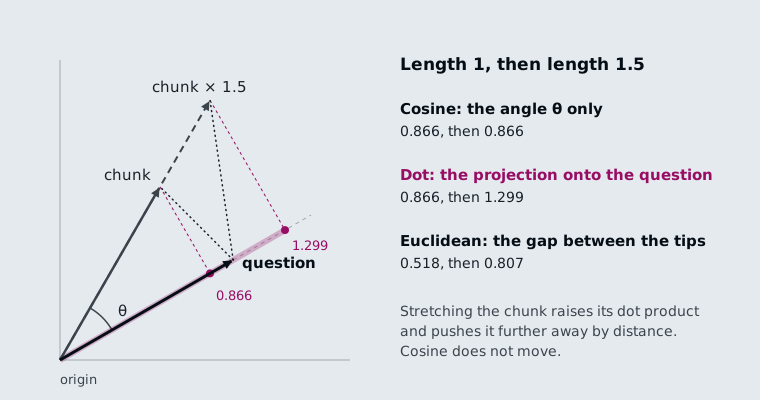
Figure 1: One question and one chunk. Stretching the chunk to 1.5× leaves its cosine at 0.866, raises its dot product from 0.866 to 1.299, and pushes its distance from 0.518 to 0.807.
When both vectors have length 1, the three agree. The dot product equals the cosine, and Euclidean distance is √(2 - 2·cos), which falls as cosine rises. All three then return the same chunks in the same order. Notebook 1 of T5.4 checks this on two real text-embedding-3-small vectors. That is why the first thing to print about a new model is the norm (length) of one of its vectors:
| Model output | Norm | Which metric |
|---|---|---|
OpenAI text-embedding-3-* |
1.0, give or take float rounding | Any of the three; pick the one your store computes fastest, usually dot product |
| sentence-transformers through the Hugging Face wrapper, default settings | Not 1 | Cosine, or turn on normalisation and then any of the three |
Table 2: The norm check, and the metric it allows.
The interactive lab draws ten Larkspur handbook chunks as 2D vectors so the angles are visible. The vectors are hand-placed and every score is computed; the lab's cosine, dot and Euclidean values match scikit-learn's to within 2e-15 at all 156 settings. Every chunk has length 1 except plans-overview, the long pricing page, whose length the slider sets, the way notebook 1 of T5.4 scales one vector by 3.0 to imitate a model that does not normalise:
plans-overview length |
How long does a refund take? | Can I export my data after I cancel? | What happens if my server goes down? |
|---|---|---|---|
| 1.0× | All three rank refund-timing first |
All three rank retention first |
All three rank sla first |
| 1.2× | Dot product ranks plans-overview first |
Dot product moves it from #4 to #3 | No change |
| 1.5× | Dot: plans-overview first; Euclidean: #4 |
Dot: plans-overview first; Euclidean: #5 |
Euclidean moves it to last |
| 3.0× | Dot: first; Euclidean: last of 10 | Dot: first; Euclidean: last of 10 | Dot and Euclidean both rank it last |
Table 3: Where plans-overview ranks as its length grows, from the lab.
We call this length bias: a ranking that follows vector length instead of meaning. The table shows three things about it:
- A small length difference reorders close scores. For the refund question, dot product prefers the pricing page from 1.15× onward. Its cosine with the question is 0.866 against
refund-timing's 0.998, and that gap is all the stretch has to overcome. - Cosine never moves. In every row, cosine ranks the evidence first and
plans-overviewthird or worse. Normalising every vector first gives the same result for all three metrics. - Length cannot rescue a wrong direction. For the outage question
plans-overviewpoints away (cosine -0.122), so a longer vector only makes its dot product more negative.
Two cautions apply whatever the metric. Cosine scores are not probabilities, and their range differs between models. A threshold such as "answer only above 0.7" (notebook 2 of T5.4's optional tutorial gives bands like this) has to be re-measured after a model change. Embeddings also encode topic more than truth: notebook 1 of T5.4 warns that a sentence and its negation embed close together, so "the plan is refundable" and "the plan is not refundable" can retrieve each other. We call that negation blindness. Negation, numeric comparison and exact identifiers such as invoice numbers are weak spots, which hybrid search in T6.1 addresses.
The same model on both sides
The model that embeds the chunks must also embed the questions, with the same dimensions setting. Breaking this rule raises no error. Notebook 1 of T5.4 indexes with text-embedding-3-small, queries with text-embedding-3-large truncated to 1536 dimensions, and gets vectors of the same shape on both sides. The search runs and returns scores from two unrelated coordinate systems:
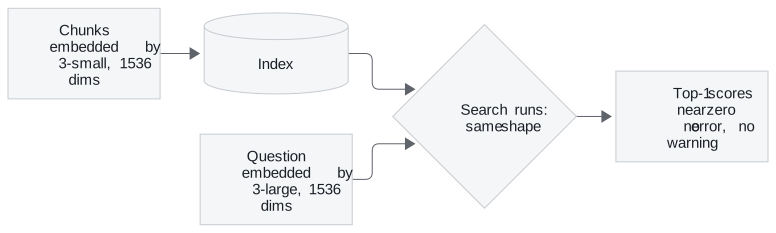
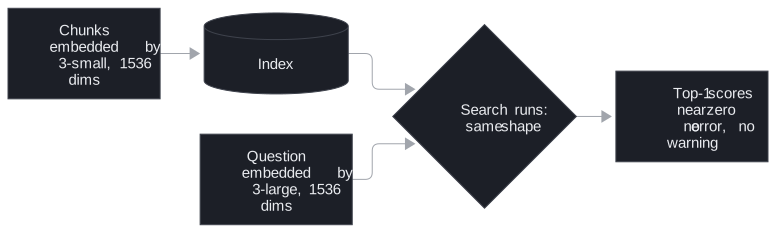
Figure 2: A silent model mismatch. The shapes match, and nothing stops the search.
We call this a silent model mismatch. The tell is the score itself: if the best match for a question that plainly has an answer in the corpus scores near zero, suspect a mismatch before you touch chunking or prompts. It happens three ways in practice:
- Config drift. The indexing job and the query service read the model name from different places, and only one gets updated.
- An unnamespaced cache. The cache returns the old model's vectors for the new model's requests (Embedding cache, lesson 4 of T5.4).
- A provider-side update. A pinned model name is not always pinned weights.
The defence is cheap. Write the model name and dimensions into the index metadata when you build it, and have the query service compare them with its own configuration before it serves a request.
In practice: choosing the metric for the Larkspur index
For the handbook index, the metric follows from two checks:
- Print the norm of one chunk vector. For
text-embedding-3-smallit is 1.0. Cosine, dot product and Euclidean then rank the same, and you can use the one the store computes fastest. - If a model returns other norms, normalise at embedding time, before length bias can reorder the refund question.
- Store the model name and dimensions in the index metadata, and check them at query time.
- Add a negation case to the golden set, such as a monthly-plan refund question, to watch for negation blindness.
Next: lesson 2 of T5.4 looks at the hosted models themselves, and what their dimensions cost to store and search.
Run the notebooks
The code for this lesson is in these notebooks. Colab runs one in your browser: install the packages its first cell imports and set the API keys it reads. To run every notebook as written, clone the repository and use its uv environment.
| Notebook | GitHub | Colab |
|---|---|---|
| Embeddings and model selection | Open on GitHub | Open in Colab |
Key Takeaways
- Print the norm of one vector from any new model. With unit-length vectors, cosine, dot product and Euclidean distance rank chunks identically; otherwise use cosine or normalise first.
- Cosine scores are not probabilities, and embeddings capture topic more than truth. Negation, numeric comparison and exact identifiers are weak spots.
- Embed chunks and questions with the same model and
dimensions. A mismatch raises no error; record both in the index metadata and check them before serving.
Check yourself
1. Why do cosine, dot product and Euclidean distance rank chunks identically when every vector has length 1?
With unit vectors the dot product equals the cosine, and Euclidean distance is √(2 - 2·cos), which falls as cosine rises. All three then return the same chunks in the same order. That is why the first thing to print about a new model is the norm of one of its vectors.
2. In the lab, the plans-overview vector is stretched to 1.5 times its length. Which chunk does dot product rank first for the refund-timing question, and what does cosine do?
Dot product ranks plans-overview first. It overtakes from 1.15× onward, because its cosine of 0.866 is not far below refund-timing's 0.998. Cosine never moves and keeps refund-timing first. Normalising every vector makes all three metrics agree with cosine.
3. After a config change, the top match for an answerable question scores near zero, and no error is raised. What do you suspect first, and what prevents it?
A model mismatch: chunks and questions embedded by different models, such as text-embedding-3-small and text-embedding-3-large truncated to 1536, give vectors of the same shape from unrelated coordinate systems. Write the model name and dimensions into the index metadata when you build it. Have the query service compare them with its own configuration before it serves a request.