The Document abstraction and metadata design
- Source
- From the RAG & Agents Engineering course
- By
- Sourav Banerjee
- Last updated
- 9 Nov 2026
Loader vs parser
What you'll learn
- Explain the difference between a loader and a parser, and which one decides the extracted text.
- Design a metadata schema with provenance, filtering, access-control and quality fields.
- Diagnose a title that never matches a query and a filter that silently returns nothing.
- Choose which fields go in the embedded text, which in metadata, and which in both.
T5.1 put Load first in the lifecycle and measured a baseline that every later change must beat. This module opens that first step, because retrieval can only return text that ingestion extracted, labelled with metadata that ingestion attached.
Larkspur's assistant answers a refund question from page 7 of the customer handbook PDF. The answer is right, but the chunk behind it starts with the page header "Larkspur Cloud · Customer Handbook", carries no section name and no policy date, and its page number counts from 0. The assistant cannot say which version of the policy it quoted, and its citation points one page early.
Every loader returns the same shape: a Document, with page_content (the text that gets embedded and shown to the model) and metadata (a dictionary that is never embedded). People say "loader" for the whole step that produces Documents, but LangChain separates two jobs:
| Loader | Parser | |
|---|---|---|
| Job | Find and fetch the source, yield Documents | Turn raw bytes into text and structure |
| LangChain type | BaseLoader (load, lazy_load) |
BaseBlobParser (lazy_parse(blob)) |
| Examples | PyPDFLoader, DirectoryLoader, WebBaseLoader, your own BaseLoader |
PyPDFParser, PyMuPDFParser, Unstructured's partition_pdf |
| What it decides | Where documents come from, how many per file | What text is extracted, in what order, with what structure |
Table 1: The two jobs inside "loading".
Most built-in loaders bundle both: PyPDFLoader fetches the file and runs pypdf on it. GenericLoader keeps them apart, a blob loader plus a parser, which lets one parser read from a folder, a bucket or an API without new code:
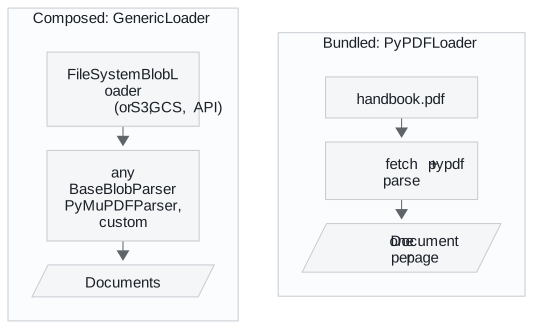
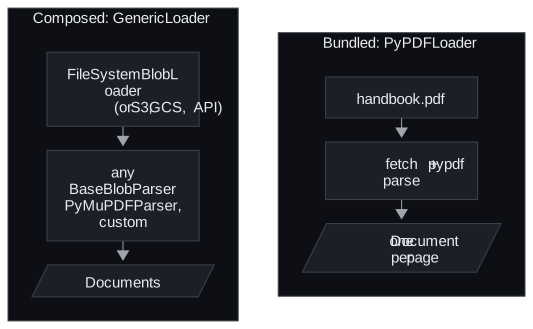
Figure 1: A bundled loader and a composed one. Only the parser box changes the extracted text.
When someone says "the PDF loader is bad", they usually mean the parser extracts the wrong text. Swapping the parser fixes that. Changing how files are fetched does not, and we call that attempt a fetch-side fix: work on the layer that was never the problem.
Metadata schema
Metadata answers questions about a chunk that similarity search cannot: where it came from, who may see it, how recent it is, what kind of content it is. A metadata schema is the fixed list of fields, with their meanings and types, that every Document must carry. It has to exist before ingestion, because every field you forget costs a full re-ingest to add.
Plan four kinds of field:
| Kind | Examples | Enables |
|---|---|---|
| Provenance | source, page, row, loader, ingested_at |
Citations, debugging, re-ingesting one file |
| Filtering | doc_type, section, date, language, version |
Narrowing the search before similarity |
| Access control | tenant_id, visibility, owner |
Multi-tenant isolation; never optional |
| Quality | extraction_method, confidence, verified |
Excluding low-quality text, audits |
Table 2: Four kinds of metadata field, and what each makes possible.
The filtering and access fields run before similarity search. A question then only competes against chunks it is allowed to see:


Figure 2: A metadata pre-filter narrows the index before similarity search runs.
The T5.2 lab asks for one shared schema across PDF, DOCX, Markdown, CSV and a web page, with five fields: source, type, section, page, date. On the handbook page, the loaders fill different parts of it:
| Loader | Fields it fills | Fields you supply |
|---|---|---|
| PyPDF | source, page, date |
type, section |
| Unstructured, element mode | source, type, section (via parent_id), page |
date |
Table 3: How much of the lab's five-field schema each PDF loader fills on the handbook page.
A filled field can still be wrong for your purpose. The file's modification time is not the policy date. Take date from your CMS.
Three hard constraints shape the design, and each has a failure we name:
| Constraint | What goes wrong | Guard |
|---|---|---|
| Metadata is not embedded | Invisible title: a title that lives only in metadata never matches a query | Put fields that should affect similarity into the text too (T5.6's contextual chunk headers do this) |
| Value types are restricted | Chroma 1.5, the version this course installs, accepts str, int, float, bool, None and non-empty lists of one of those types. A nested dict, an empty list or a mixed list such as [1, "x"] fails the write |
Flatten values before you index |
| Filters match exactly | Case-split filter: {"department": "Engineering"} does not match "engineering", and the filter returns nothing |
Normalise values when you load |
Table 4: Three constraints on metadata, the failure each one causes and its guard.
In practice: a schema for the Larkspur handbook
For the refund chunk in the opening example, the schema decisions come before the first load:
- Choose the parser for the layout. Page 7 has two columns and a pricing table. An element-level parser (lesson 4 of T5.2) is worth its cost there, and it also separates the page header from the text.
- Fill provenance on every Document.
sourceis the file,pageis stored 1-based so citations match the printed page. - Supply what the parser cannot.
typecomes from the route that loaded the file,datefrom the CMS record of the policy. - Keep the section in two places. As metadata for filtering, and as a short header in the chunk text so a question that names "Refunds" can match it.
Next: lesson 2 of T5.2 starts with the simplest sources, plain text and Markdown, where the single choice is whether one file becomes one Document or many.
Run the notebooks
The code for this lesson is in these notebooks. Colab runs one in your browser: install the packages its first cell imports and set the API keys it reads. To run every notebook as written, clone the repository and use its uv environment.
| Notebook | GitHub | Colab |
|---|---|---|
| Document loading and metadata | Open on GitHub | Open in Colab |
| Document loaders overview (optional) | Open on GitHub | Open in Colab |
Key Takeaways
- A loader fetches the source and a parser turns bytes into text. When the extracted text is wrong, swap the parser.
- Design the metadata schema before ingestion: provenance, filtering, access control and quality fields. Every forgotten field costs a full re-ingest.
- Metadata is not embedded, accepts only flat value types, and filters match exactly. Put fields that should affect similarity into the text, flatten values and normalise case.
Check yourself
1. A teammate says the PDF loader is bad because the extracted text comes out wrong. Do you change the loader or the parser?
The parser. The loader decides where documents come from and how many there are per file. The parser decides what text is extracted, in what order and with what structure. Changing how files are fetched is a fetch-side fix, and GenericLoader lets you swap the parser without touching the fetching.
2. You load the handbook page with PyPDF for the lab's five-field schema. Which fields does it fill, and which must you supply yourself?
PyPDF fills source, page and date, so you supply type and section. Unstructured would fill section through parent_id. Even a filled field can be wrong for your purpose: take date from your CMS rather than the file's modification time.
3. You store each document's title only in metadata, and questions that name the title never retrieve its chunks. What went wrong?
Metadata is not embedded, so a title that lives only there never matches a query. If a field should affect similarity, also put it into the chunk text, which is what T5.6's contextual chunk headers do. Keep it in metadata as well when you want to filter on it.