Semi-structured sources: CSV rows and JSON / JSONL with jq schemas
- Source
- From the RAG & Agents Engineering course
- By
- Sourav Banerjee
- Last updated
- 9 Nov 2026
One record, one Document
What you'll learn
- Explain how a CSV loader and a JSON loader decide which record becomes one Document.
- Diagnose empty Documents, a column missing from the embedded text, and a header read as data.
- Choose per field whether it belongs in the embedded text, the metadata or both.
- Apply the right type and provenance to loader metadata before indexing.
Lesson 2 of T5.2 loaded Markdown, where the question was how many Documents a file becomes. A CSV or JSON file already has records. The loader's job is to decide which record becomes one Document. That choice sets the smallest thing retrieval can return, the same way element-level parsing does for a PDF (lesson 4 of T5.2).
Larkspur exports the handbook's plan table as plans.csv so the assistant can answer How much memory does the Business plan have? A teammate moves the plan name and price into metadata to make them filterable. The question stops retrieving the Business row, because the word "Business" is no longer in any text that gets embedded.
The CSV loader makes one Document per row. Each line of page_content is column: value, and metadata gets the file and the row number, counted from 0. plans.csv gives three Documents. The Business row:
| Part | Value |
|---|---|
page_content |
Five lines: plan: Business, vcpu: 4, memory_gb: 16, traffic_tb: 5, price_usd: 48 |
metadata |
source: plans.csv, row: 1 |
Table 1: The Business row of plans.csv as a Document, with default settings.
The Unstructured CSV loader goes the other way and returns the whole file as one table Document. Use it when the question is about the table as a whole. Use the row loader when each row answers a question on its own, as the Business memory question does.
The JSON loader has no fixed record. A jq schema is a path expression that says where one Document starts, and the notebook's chat_data.json shows how much it decides:
| jq schema | Documents | Each Document holds |
|---|---|---|
. |
1 | The whole file as JSON text, 1,612 characters |
.messages[] |
11 | One message object as JSON text, keys included |
.messages[].content |
11 | One message's text; one of them is empty, because a photo message has no content |
Table 2: Three jq schemas on the same chat export.
The empty Document is the failure to watch for here, and we call it an empty record. A jq path that misses on some records still yields a Document for them, with empty page_content, and it gets embedded like any other. Count empty Documents after every load. For JSON Lines files, a flag runs the schema once per line.
Content fields and metadata fields
Every column or key ends up in one of three places: the embedded text, the metadata, or both. Text is what similarity search can match, and metadata is what a filter can match exactly (lesson 1 of T5.2). Decide per field:
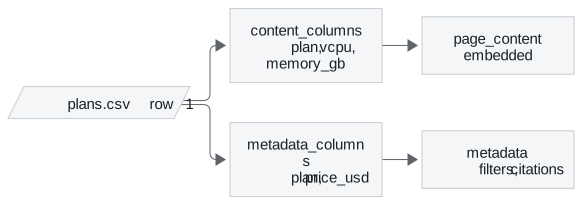
Figure 1: One row split into embedded text and metadata. plan is listed on both sides: it can be matched and filtered.
The CSV loader takes three settings for this: content_columns, metadata_columns and source_column. Its defaults hold three traps, and all three show up on plans.csv. One more comes from the notebook's own data:
| Setting | What happened | Name | Guard |
|---|---|---|---|
metadata_columns = plan, price, no content_columns |
The Business text became vcpu: 4, memory_gb: 16, traffic_tb: 5; "Business" is gone from the embedding |
Text-stripped column | List plan in content_columns too, so it lands in both places |
| Any metadata column | The price reads as the string '48'; a filter for "plans under $50" compares numbers |
String numbers | Cast numeric fields to int or float at load time |
source_column = plan |
The metadata says source: Business, and nothing records which file the row came from |
Lost file path | Keep the file path in its own field |
Renamed fieldnames on a file that has a header |
The five-row data.csv loads as six Documents; the first reads Property ID: Property_ID |
Header-as-row | Rename the columns in the file, or drop the first Document |
Table 3: Four CSV loader settings, the failure each caused and its guard.
The JSON loader splits the same decision across two arguments. content_key names the field that becomes page_content, and a metadata function copies the fields you want to filter on. The notebook copies sender_name and timestamp_ms, so a query can ask for one person's messages in a time range.
The two loaders also disagree on provenance. The JSON loader stores source as an absolute path and counts seq_num from 1. The CSV loader writes source as you passed it and counts row from 0. Lesson 5 of T5.2 maps these differences onto one schema.
In practice: plans.csv for the Larkspur assistant
To answer both How much memory does Business have? and Which plans cost under $50? from the same file:
- One Document per row, so each plan can be retrieved on its own.
planin both the text and the metadata, so it can be matched by similarity and filtered exactly.price_usdcast to a number in metadata, for range filters.sourcekept as the file path, withrowbeside it, so a citation can open the right file at the right row.- Count empty Documents after the load, which catches a column or jq path that missed.
Next: lesson 4 of T5.2 returns to files with layout, PDFs and Word documents, where the parser decides what text exists at all.
Run the notebooks
The code for this lesson is in these notebooks. Colab runs one in your browser: install the packages its first cell imports and set the API keys it reads. To run every notebook as written, clone the repository and use its uv environment.
| Notebook | GitHub | Colab |
|---|---|---|
| Csv loader (optional) | Open on GitHub | Open in Colab |
| JSON loader (optional) | Open on GitHub | Open in Colab |
Key Takeaways
- For CSV and JSON, decide which record becomes one Document: the CSV loader gives one per row, and the jq schema sets the record for the JSON loader. Count empty Documents after every load.
- Decide per field whether it goes in the embedded text, the metadata or both. A column listed only in
metadata_columnsdisappears from the text. - Loader metadata values arrive as strings and
source_columnoverwrites the file path. Cast numbers and keep the file path in its own field.
Check yourself
1. What does the jq schema passed to the JSON loader decide, and why does it matter for retrieval?
It decides where one Document starts, and so the smallest thing retrieval can return. On chat_data.json, . gives one Document of 1,612 characters, while .messages[] gives 11, one per message. A path that misses on some records still yields an empty Document, so count empty Documents after every load.
2. You load plans.csv with metadata columns set to plan and price and no content columns. What text gets embedded for the Business row, and what breaks?
The text becomes vcpu: 4, memory_gb: 16 and traffic_tb: 5, because metadata_columns alone removes those columns from the text. The word "Business" is gone from the embedding, so a question about the Business plan cannot match it. List plan in content_columns too, and cast price_usd to int, since it stays the string '48'.
3. A five-row CSV loads as six Documents, and the first one reads Property ID: Property_ID. What caused it?
The loader was given new fieldnames to rename columns on a file that already has a header row, so the header was read as a data row. Rename the columns in the file instead, or drop that first Document.