Splitter fundamentals: character, recursive, token and structure-aware
- Source
- From the RAG & Agents Engineering course
- By
- Sourav Banerjee
- Last updated
- 9 Nov 2026
Chunk size and overlap
What you'll learn
- Explain how a recursive splitter chooses its cuts, and what chunk size and overlap control.
- Diagnose a half-answer caused by a boundary cut, and tell whether overlap can fix it.
- Compare small and large chunks by what they hold, what they dilute and what they store.
- Choose structure-aware splitting first and a size cap second for documents with markup.
T5.2 turned files into Documents with a schema. Most Documents are still too long to embed as one vector. The next step cuts them into chunks: the pieces that get embedded, retrieved and shown to the model.
A customer asks Can I get a full refund on my annual plan? The retriever returns a chunk that says refunds are available "within 30 days of purchase, as long as the account has used less than" and stops. The model answers with the 30-day rule and no traffic condition. The 100 GB limit sits at the top of the next chunk, which was not retrieved. We call this a boundary cut: a fact split between two chunks, which hands the model a confident half-answer.
The recursive character splitter tries its separators in order: blank line, line break, space, then single characters. It splits on the first one present, merges pieces back up to the chunk size, and recurses into any piece that is still too long. The chunk overlap is how many trailing characters of one chunk it may repeat at the start of the next:
- The splitter gets the 1,111-character refund section, with chunk_size 300 and no overlap.
- It splits on the first separator present, the blank line, which gives five pieces of 25, 262, 525, 151 and 148 characters.
- The first two pieces fit together under 300, so they merge into chunk 1 (287 characters).
- The 525-character paragraph is over 300, so the splitter recurses into it with the next separator. A line break only peels off the blank line in front.
- It falls through to spaces and splits the paragraph into 95 words.
- The words merge back up to 300 characters, giving chunk 2 (297) and chunk 3 (225).
- The last two paragraphs fit together as chunk 4 (297).
- The answer sentence lands 113 characters in chunk 2 and 27 in chunk 3, cut after “used less than”.
Figure 1: The recursive splitter on the handbook's refund section at chunk size 300.
At chunk size 300 the blank lines give five pieces of 25, 262, 525, 151 and 148 characters, each counting the blank line in front of it. The first two merge into chunk 1 (287 characters). The 525-character paragraph is too long, and a line break only peels off its leading blank line. The splitter falls through to spaces, splits the paragraph into 95 words and merges them into chunks 2 and 3. The last two paragraphs merge into chunk 4. The cut between chunks 2 and 3 lands inside the answer sentence:
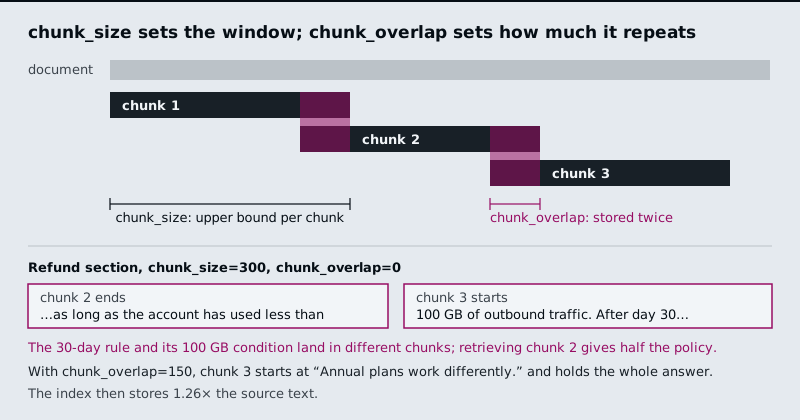
Figure 2: How overlap works, and the 300/0 split of the refund section. With 150 characters of overlap, chunk 3 holds the whole answer.
The interactive lab runs a JavaScript port of the LangChain splitter on the refund section, and it matches langchain_text_splitters exactly at all 1,061 slider positions. Five settings from the lab:
| Chunk size / overlap | Chunks | Stored ÷ source | Answer in one chunk? | Answer share of its chunk |
|---|---|---|---|---|
| 140 / 0 | 11 | 0.99× | No: the sentence is longer than the chunk | none |
| 300 / 0 | 4 | 1.00× | No: cut after "…used less than" | none |
| 300 / 150 | 5 | 1.26× | Yes, chunk 3 | 47% |
| 500 / 50 | 4 | 1.04× | Yes, chunk 2 | 28% |
| 1200 / 0 | 1 | 1.00× | Yes, the whole section | 13% |
Table 1: Five chunk settings on the refund section, from the lab.
Each row teaches one rule:
- A chunk smaller than the fact can never hold it. At 140 characters, no overlap helps.
- A boundary cut produces a confident half-answer. At 300/0, chunk 2 gives the model the 30-day rule without the 100 GB condition, as in the opening example.
- Overlap only rescues a piece that fits inside it. At 300/100 the answer is still cut, because the part left in chunk 2 is longer than 100 characters. At 300/150 it fits, and the index stores 26% more text.
- Bigger chunks keep facts whole and dilute them. At 1200 the answer is 13% of the chunk, and the other 87% is about monthly plans, refund timing and credits. The chunk's embedding averages all of it, and the model reads all of it. We call that a diluted chunk.
Two more effects show at the edges. At 500/50 the splitter leaves a 72-character trailing stub ("to the original payment method and take 5 to 10 business days…"). Tiny trailing chunks like this retrieve badly. Merge them or set a minimum size. At 300/150, chunk 4 starts mid-phrase with "GB of outbound traffic", because overlap carries whole words and ignores sentence boundaries.
Measure length in tokens when the limit that matters is the embedding model's input or the prompt budget. The recursive splitter can count tokens with a tokenizer while keeping its separators, and the notebook makes that the default for prose. English prose runs about four characters per token, but the ratio shifts by 2× or more for code, URLs and compound words. A character limit then drifts across content types, which we call token drift. Characters are fine for comparing settings on one document, as the lab does.
Structure-aware splitting
Many documents already mark their own boundaries. Structure-aware splitting cuts on those boundaries first, which keeps each section intact and gives you metadata for free:
| Content | Splitter | What it uses |
|---|---|---|
| Markdown | MarkdownHeaderTextSplitter |
#, ##, ###; header text goes into metadata ({"Header 2": "Refunds"}) |
| HTML | HTMLHeaderTextSplitter, HTMLSectionSplitter |
<h1> to <h6> and sections |
| Code | The recursive splitter with a language preset | class, def, then blank lines |
| Elements from T5.2 | Group Unstructured elements by parent_id |
Titles and their children |
Table 2: Structure-aware splitters and the boundaries each one uses.
On the Markdown handbook, each section becomes its own chunk with its heading in metadata:
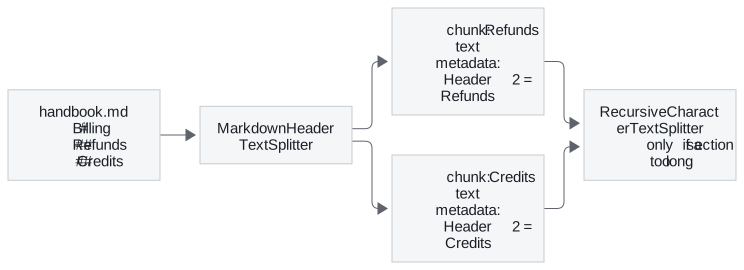
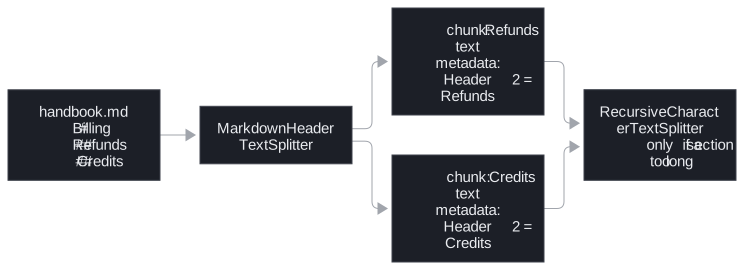
Figure 3: Header splitting first, a size cap second.
Run a size-based splitter after the structural one, because one long section can still exceed your limit. Use the header metadata in two places. Filter on it at query time ("only the Refunds section"), and prepend it to the chunk text so the embedding knows which section a sentence came from. T5.6 calls that a contextual chunk header.
In practice: chunking the Larkspur refund section
For the handbook, the settings follow from Table 1 and the structure:
- Split on headings first, so the refund section never shares a chunk with billing or credits.
- Cap long sections by size. The 1,111-character refund section still needs cutting, and 500/50 keeps the answer whole in chunk 2.
- Merge the 72-character trailing stub into the chunk before it.
- Prepend "Refunds" to each chunk's text and keep it in metadata for filtering.
- Count tokens, not characters, if the embedding model's input limit is close.
Next: lesson 2 of T5.3 drops fixed sizes altogether and cuts where the meaning of the text changes.
Run the notebooks
The code for this lesson is in these notebooks. Colab runs one in your browser: install the packages its first cell imports and set the API keys it reads. To run every notebook as written, clone the repository and use its uv environment.
| Notebook | GitHub | Colab |
|---|---|---|
| Document splitting and chunking | Open on GitHub | Open in Colab |
| Document splitters and chunkers (optional) | Open on GitHub | Open in Colab |
| Text splitters and chunking strategies (optional) | Open on GitHub | Open in Colab |
Key Takeaways
- A chunk smaller than the fact can never hold it, and overlap rescues only a piece that fits inside it. A boundary cut hands the model a confident half-answer.
- Bigger chunks keep facts whole but dilute them: at 1200 characters the refund answer is 13% of its chunk. Merge tiny trailing chunks, and count tokens when a model limit applies.
- Split on the document's own structure first, then cap long sections with a size-based splitter. Use header metadata for filtering and as a prefix in the chunk text.
Check yourself
1. At chunk size 300, an overlap of 100 leaves the refund answer cut, but an overlap of 150 keeps it whole. Why?
Overlap only rescues a piece that fits inside it. At 300/100 the part of the answer left in chunk 2 is longer than 100 characters, so it is still cut. At 300/150 it fits, and chunk 3 holds the whole answer, at the cost of storing 26% more text (1.26× the source).
2. You split the refund section at chunk size 1200 with no overlap. Does the answer survive, and what does it cost?
The answer survives, because the whole section becomes one chunk, but it is only 13% of that chunk. The other 87% is about monthly plans, refund timing and credits, and the chunk's embedding averages all of it while the model reads all of it. Bigger chunks keep facts whole and dilute them.
3. Your handbook is Markdown, and after splitting on headers one section is still longer than your limit. What do you do, and how do you use the header metadata?
Run a size-based splitter such as the recursive character splitter after the structural one, so the long section is capped. Use the header metadata twice: filter on it at query time ("only the Refunds section"), and prepend it to the chunk text so the embedding knows which section a sentence came from. T5.6 calls that a contextual chunk header.