Vector indexes on graph nodes
- Source
- From the RAG & Agents Engineering course
- By
- Sourav Banerjee
- Last updated
- 9 Nov 2026
When the question has no exact name
What you'll learn
- Explain graph plus vector retrieval as two stages: similar candidates, then exact checks.
- Trace the candidate budget in the lab, and why recall jumps at
k=3andk=5.- Diagnose the similar-but-ineligible candidate and per-row embedding calls.
- Choose vector-first or graph-first retrieval from what the question pins down.
Lesson 3 of T13.2 assumed the question names its entities. A Larkspur customer writes I need a plan that lets me pull my data out from the Frankfurt side. No label, no plan id, no "export" and no "EU". A Cypher pattern has nothing to bind.
Vector search can find a starting point for wording like this. The failure is that it finds text that sounds right. A refund guide linked to the EU region can rank above every plan that actually supports export there.
Graph + vector hybrid
Graph plus vector retrieval uses a vector index to rank nodes whose text resembles the question, then uses graph relationships to keep only the candidates that meet the question's exact constraints. The vector stage handles vague wording; the graph stage handles facts such as "supports export" and "available in the EU". Keep the two stages visible: a candidate dropped at either stage then has a recorded reason.
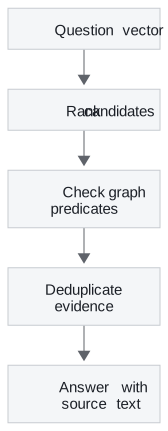
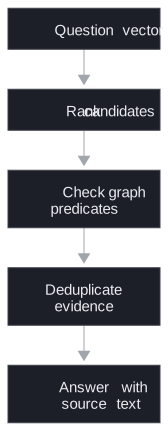
Figure 1: Vector-first retrieval. Ranking proposes; the graph predicates decide.
How the notebook builds the index
The notebook adds a vector index to the healthcare graph from lesson 2 of T13.2. The pieces, in the order it creates them:
| Piece | Notebook setting | What it decides |
|---|---|---|
| Index | health_providers_embeddings on HealthcareProvider.comprehensiveEmbedding |
which nodes and which property are searchable |
| Dimensions | 1536 | must equal the embedding model's output size |
| Similarity | cosine | how closeness between vectors is scored |
| Stored vectors | each provider's bio, embedded inside the database and written to the node |
what text the ranking sees |
| Query | the question embedded the same way, top 3 nodes | the candidate budget k |
Table 1: The notebook's vector index, piece by piece.
The 1536 dimensions belong to the notebook's embedding model, not to every model. Query vectors and stored vectors must come from the same model with the same dimensionality, or the scores mean nothing. After creating the index, list the vector indexes and wait until this one reports ONLINE before searching.
The notebook searches with the db.index.vector.queryNodes procedure. Current Neo4j vector-index documentation prefers a SEARCH clause on recent releases and marks the procedure deprecated from 2026.04. Check the deployed database version before copying either form.
Planted failure: one embedding call per row
The embedding step starts by matching every provider that TREATS a patient, then embeds the provider's bio. A MATCH returns one row per matching path, not one per provider. On the graph that lesson 2 of T13.2's import builds there are 368 TREATS edges, which means 368 embedding calls for 5 distinct bios (replayed from the CSV; no database or embedding call was run). We call this row multiplication. Reduce to distinct providers before calling anything that costs money.
Text and edges can disagree
The notebook's question asks for providers "in the area of dermatology". Only one bio mentions dermatology, Dr. Jessica Lee's. The graph links four providers to the Dermatology node, because the import flattened its rows. The vector stage and the graph stage would give different answers, and neither is the truth: one reads a bio, the other reads edges that lost their row context. Hybrid retrieval inherits the quality of both sources, which is why the next section measures them separately.
Candidate budget and constraints
The interactive lab runs Figure 1 on Larkspur's teaching catalogue: eight records, hand-placed two-dimensional vectors and a question vector of [1, 0]. It ranks every record by exact cosine similarity, keeps the top k, and checks each kept record for an outgoing SUPPORTS edge to export and an AVAILABLE_IN edge to the EU. These are illustrative vectors and invented records, not model embeddings and not a benchmark of Neo4j's approximate index.
At k = 8 the lab's ledger shows every record with its score and its graph check:
| Rank | Record | Cosine | Graph check |
|---|---|---|---|
| 1 | Refund guide | 0.995 | Missing export |
| 2 | US Export | 0.976 | Missing EU |
| 3 | EU Team | 0.936 | Eligible |
| 4 | Backup guide | 0.868 | Missing export |
| 5 | EU Enterprise | 0.768 | Eligible |
| 6 | Billing guide | 0.640 | Missing export |
| 7 | Audit guide | 0.496 | Missing export |
| 8 | Legacy plan | 0.351 | Missing EU |
Table 2: The lab's candidate ledger at k = 8. The two most similar records both fail a graph check.
The top two records are the similar-but-ineligible failure. The refund guide is linked to the EU and ranks first, but has no export edge. US Export supports export but is not in the EU. Moving the budget shows what that costs:
k |
Checked | Eligible found | Recall |
|---|---|---|---|
| 2 | 2 | 0 / 2 | 0% |
| 3 | 3 | 1 / 2 | 50% |
| 4 | 4 | 1 / 2 | 50% |
| 5 | 5 | 2 / 2 | 100% |
| 8 | 8 | 2 / 2 | 100% |
Table 3: Recall against the candidate budget, as the lab prints it.
The lab's recall divides surviving eligible records by every eligible record in a complete toy catalogue. A production system has no complete list; its recall needs independently labelled questions and answers.
Each unit of k is one more candidate scored and one more set of graph checks. At k = 5 the lab checks 5 records to find 2; at k = 8 it checks 8 and finds the same 2, so the last 3 checks add work and no answer. When an eligible plan is missing, move the budget before changing the schema. Raise k until recall stops changing on labelled questions, then stop.
What a bigger budget cannot fix
The graph check is a post-filter, so it can return fewer than k results, including none. A larger k gives the graph more candidates. It cannot fix a missing AVAILABLE_IN edge, an entity that was never resolved to the right plan, or an eligible plan whose text ranks below every budget you can afford. Authorisation is a separate constraint again: apply it to every branch of retrieval, and never treat it as a relevance filter that a bigger budget might relax.
Choosing the order
Vector-first is one of two orders. When the question names its constraints exactly, the graph can go first:
| Vector-first (Figure 1) | Graph-first | |
|---|---|---|
| Starts from | vague wording | known ids and relationships |
| Finds | candidates similar to the question | every node meeting the constraints |
| Main risk | eligible answer outside the top k |
no match for a vague question |
| Cost driver | k times the graph checks |
graph degree and indexes |
| Larkspur example | "pull my data out from the Frankfurt side" | "EU plans with export" |
Table 4: The two orders for combining vectors and graph constraints.
For "EU plans with export" the exact two-arm Cypher from lesson 1 of T13.2 returns both eligible plans over the whole graph, with no budget to tune. Use the vector stage when there is no exact starting point, and compare its recall curve with that exact match on the questions where both apply. Lesson 5 of T13.2 turns to where the graph's relationships come from when there is no CSV, only text.
Run the notebooks
The code for this lesson is in these notebooks. Colab runs one in your browser: install the packages its first cell imports and set the API keys it reads. To run every notebook as written, clone the repository and use its uv environment.
| Notebook | GitHub | Colab |
|---|---|---|
| Vector indexing and embedding | Open on GitHub | Open in Colab |
Key Takeaways
- Vector search ranks text that resembles the question; graph checks confirm explicit relationships. Keep both stages visible so each dropped candidate has a reason.
- Query and stored vectors need the same model and dimensionality. Check the database version for the current search syntax, wait for the index to be
ONLINE, and embed distinct nodes, not matched rows. - In the lab, recall is 0% at
k = 2, 50% atk = 3and 100% atk = 5. A bigger budget cannot fix a missing edge or an unresolved entity, and authorisation applies to every branch.
Check yourself
1. Why keep vector candidate selection and graph relationship checks as separate stages?
Vector search finds text that resembles the question, and graph matching checks explicit relationships. In the lab the refund guide ranks first and US Export second, yet neither supports export in the EU. Separate stages record why each candidate was dropped.
2. In the graph filter lab, how many eligible plans survive at k = 2, 3 and 5, and what does raising k past 5 buy?
None at k = 2, EU Team at k = 3, and both EU Team and EU Enterprise at k = 5. Past that, each extra candidate is scored and checked without adding an answer on this fixture. A bigger k also cannot fix a missing relationship or an unresolved entity.
3. The notebook's embedding step matches every provider that treats a patient, then embeds the bio. What does that cost on the imported graph, and how do you fix it?
The match returns one row per TREATS edge, so the embedding runs once per row: 368 times for 5 distinct bios on the replayed graph. Reduce the rows to distinct providers before the embedding call.