Graph fundamentals and Cypher
- Source
- From the RAG & Agents Engineering course
- By
- Sourav Banerjee
- Last updated
- 9 Nov 2026
Questions that are joins
What you'll learn
- Explain nodes, relationships and properties, and why identity and direction are modelling decisions.
- Read a Cypher pattern that binds one plan across two relationships.
- Diagnose the cross-product match, where two conditions are met by two different plans.
- Separate a missing edge from a false claim before anyone phrases an answer.
T13.1 ended with lightweight graph retrieval as one option among summaries and memory. This module builds the graph itself, in Neo4j, and asks it questions that similarity search cannot settle.
A Larkspur support engineer asks: Which plans support data export in the EU? A vector index returns two passages that both look relevant. One says a plan supports export. The other says a plan is available in the EU region. Nothing in either passage says they describe the same plan. The question is a join: one entity has to satisfy two facts, and text similarity has no notion of "the same entity".
This module uses a small teaching catalogue of Larkspur plans (EU Team, EU Enterprise, US Export, Legacy plan) that is also the fixture in the lesson 4 of T13.2 lab. It is separate from the handbook's own plan list. The notebook teaches the same ideas on a five-node graph about Albert Einstein.
The page has two jobs: describe what a graph stores, then show how a query asks for a joined fact.
Nodes, edges, properties
A property graph stores entities as nodes, typed and directed relationships between them, and properties (key and value pairs) on either. A node carries one or more labels, such as Plan or Feature, which say what kind of thing it is. A relationship has exactly one type, such as SUPPORTS, and always points from one node to another.
Larkspur's question needs three nodes and two relationships:
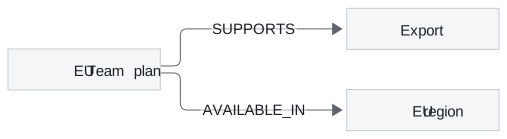
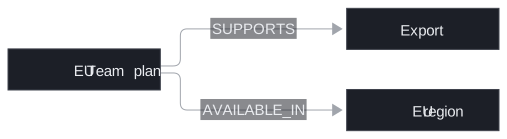
Figure 1: One plan, two facts. The plan node is shared, which is what makes the question answerable.
Each part of the model has its own job, and the notebook's graph uses the same parts:
| Part | Larkspur fixture | Notebook graph | What it decides |
|---|---|---|---|
| Label | Plan, Feature, Region |
Person, Subject, NobelPrize, Country |
which kind of entity a pattern can match |
| Identity property | id: "eu-team" |
name: "Albert Einstein" |
which node a write or a query lands on |
| Descriptive property | display name, description | none | what the answer can say about the node |
| Relationship type | SUPPORTS, AVAILABLE_IN |
STUDIED, WON, BORN_IN, DIED_IN |
which question a path can answer |
Table 1: The parts of a property graph, in the teaching fixture and in the notebook.
The notebook writes five nodes (Einstein, Physics, the Nobel Prize in Physics, Germany and the USA) and four relationships, all pointing out of the Einstein node:
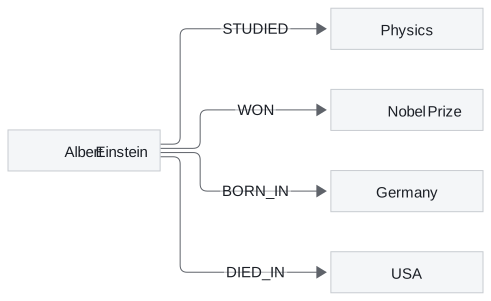
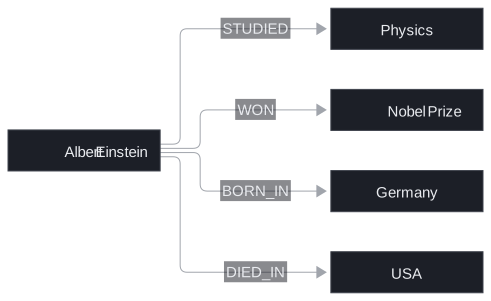
Figure 2: The notebook's graph. Five nodes, four relationships, one shared starting node.
It writes them with MERGE, which matches a node or relationship if it exists and creates it if it does not. Running the build twice therefore leaves five nodes, not ten. The notebook identifies each node by its name property. That works for five famous entities; lesson 2 of T13.2 shows where a name stops being a safe identity.
Direction carries meaning
The arrow is part of the fact. Plan SUPPORTS Feature and Feature DEPENDS_ON Service answer different questions, and reading an edge backwards changes the claim. In Figure 2, BORN_IN points from the person to the country; a query that walks it the other way finds who was born in Germany, which is a different question.
Choosing relationship types and directions is part of modelling the handbook, and it happens before any retrieval algorithm runs. A good test is to write each golden question as a path first. If a question has no path in the model, no query can answer it.
An absent edge is not a no
A graph answers only the relationships you stored or can derive from them. If the EU Team plan has no AVAILABLE_IN edge to the EU region, three different things could be true: the plan is not available there, the source never said so, or extraction missed the sentence that did. We call this silent absence: an empty match looks the same in all three cases.
The practical rule is to keep the source of each relationship (lesson 2 of T13.2) so a missing edge can be traced back to a document, and to phrase empty results as "no matching facts in this graph" rather than "no". With the model in place, the next step is asking for a joined fact.
Cypher
Cypher is Neo4j's query language: you draw the shape you want with nodes in parentheses and relationships as arrows, and the database returns every way that shape matches the stored graph. Variables name parts of the shape. When the same variable appears twice, both appearances must be the same node.
The EU export question becomes one pattern with two arms:
| Clause | What it says | Why it matters |
|---|---|---|
MATCH arm 1 |
plan p has a SUPPORTS edge to the feature whose id is the parameter feature |
finds plans with export |
MATCH arm 2 |
the same p has an AVAILABLE_IN edge to the region whose id is the parameter region |
keeps only those also in the EU |
RETURN DISTINCT p.id |
one row per plan | removes repeated rows from several matching paths |
ORDER BY plan |
sorted output | stable results for tests |
| Parameters | feature = "export", region = "eu" passed separately from the query text |
the query is reused, and values never get spliced into Cypher |
Table 2: The EU export query, clause by clause.
The shared p carries the join. Run against the lab's fixture edges, the query returns exactly the plans that have both relationships:
| Plan | SUPPORTS export |
AVAILABLE_IN eu |
Shared p |
Separate variables |
|---|---|---|---|---|
| EU Team | ✓ | ✓ | returned | returned |
| EU Enterprise | ✓ | ✓ | returned | returned |
| US Export | ✓ | ✗ | not returned | returned |
| Legacy plan | ✓ | ✗ | not returned | returned |
Table 3: The query over the lesson 4 of T13.2 lab's fixture edges. With one variable per arm, any export plan pairs with any plan in the EU.
The last column is the cross-product match. Give each arm its own plan variable and Cypher pairs every export plan with every EU plan, so four plans come back instead of two. The query is valid, runs without error and is wrong.
Pitfall: DISTINCT is not deduplication.
DISTINCTremoves repeated result rows. If the import created two EU Team nodes, both come back, because they are different nodes. Fixing duplicate entities is an import problem, covered in lesson 2 of T13.2.
The notebook's queries
The notebook runs two read queries. One lists every node's name. The other returns four paths out of the Einstein node, one per relationship type, joined with UNION. Each arm of that union names its relationship type explicitly, which means a fifth relationship added later would not appear until someone adds a fifth arm. A single pattern with an untyped relationship would return all of them, at the cost of returning edges you did not ask about.
It writes with MATCH followed by MERGE: find both endpoints first, then create the relationship between them only if it is missing. If either endpoint is absent, the MATCH finds nothing and no edge is written, without an error. That is silent absence again, this time created at write time.
Sessions and the driver
The notebook opens one Neo4j driver and runs work inside sessions. Two habits matter beyond this notebook. Read a query's results while its session is still open, because they stream from the database. Keep one driver for the life of the program and close it once at the end.
Some of the notebook's helper functions close the shared driver in their finally block. Run the build cell and then another cell that uses the same driver, and the second one fails with a closed driver. Running cells out of order can mean recreating the driver first.
Read the paths before the wording
When a model phrases the result ("No plan supports export in the EU"), the sentence can only be as good as the rows behind it. Inspect the returned paths and their source facts first. If the pattern used the wrong label, a reversed direction or the wrong identifier, the rows are empty, and a fluent answer cannot supply the relationship the query failed to match. Lesson 2 of T13.2 turns to where those nodes and edges come from.
Run the notebooks
The code for this lesson is in these notebooks. Colab runs one in your browser: install the packages its first cell imports and set the API keys it reads. To run every notebook as written, clone the repository and use its uv environment.
| Notebook | GitHub | Colab |
|---|---|---|
| Kg simple | Open on GitHub | Open in Colab |
Key Takeaways
- A property graph stores labelled nodes, typed directed relationships and properties on both. Choose identity keys, relationship types and directions by writing each golden question as a path first.
- An empty match cannot tell "false" from "never stored" from "missed by extraction". Keep each edge's source and phrase empty results as missing facts.
- Reuse one variable when one entity must satisfy several patterns, and pass values as parameters. Separate variables give a cross-product match, and
DISTINCTdoes not merge duplicate nodes.
Check yourself
1. Why are relationship types and directions modelling decisions, and what can it mean when an expected edge is absent?
The arrow is part of the fact: Plan SUPPORTS Feature answers a different question from Feature DEPENDS_ON Service, and reading an edge backwards changes the claim. A graph answers only what was stored or can be derived. An absent edge can mean the fact is false, the source never stated it, or extraction missed it.
2. The EU export query reuses one variable p in both patterns. What goes wrong over the fixture if each pattern binds its own plan variable?
It becomes a cross-product match: every export plan pairs with every plan in the EU. Over the fixture, US Export and Legacy plan come back beside EU Team and EU Enterprise, four plans instead of two. DISTINCT would not help, because the rows are different plans.
3. A model-phrased answer says no plan supports export in the EU, and you expected one. What do you inspect before the wording?
The rows and paths the query returned, and the source facts behind them. Check that the pattern used the stored labels, directions and identifiers, and whether the expected edges exist at all. A fluent sentence cannot supply a relationship the query failed to match.