Databases from Python: SQLite, MySQL, PostgreSQL
- Source
- From the RAG & Agents Engineering course
- By
- Sourav Banerjee
- Last updated
- 9 Nov 2026
SQL from Python
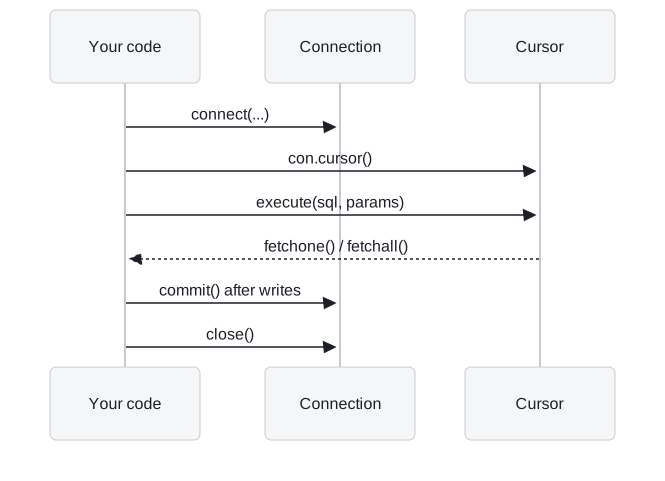
Python talks to SQLite, MySQL and PostgreSQL through the same interface, the DB-API (PEP 249): open a connection, get a cursor, execute a statement, fetch rows, commit writes, close. The three notebooks differ only in the driver and the connection arguments. sqlite3 ships with Python and opens a file or :memory:; PyMySQL and mysql.connector need a MySQL server; psycopg2 needs a PostgreSQL server.
RAG systems keep structured facts in tables because a lookup beats a similarity search when the answer is one exact value. The Larkspur handbook says support tickets are answered within 4 hours on business plans and within 24 hours on starter plans. As a table:
import sqlite3

con = sqlite3.connect(":memory:")
con.execute("CREATE TABLE plans (name TEXT PRIMARY KEY, support_hours INTEGER)")
with con:                                    # commits on success, rolls back on an exception
    con.executemany("INSERT INTO plans VALUES (?, ?)",
                    [("business", 4), ("starter", 24)])

plan = "starter"                             # from the customer's account
con.execute("SELECT support_hours FROM plans WHERE name = ?", (plan,)).fetchone()   # (24,)
Values go in as parameters. The ? tells the driver to send plan as data, separately from the SQL text. Build the same query with an f-string and the value becomes part of the SQL: with plan = "starter' OR '1'='1" it returns [(4,), (24,)], every plan in the table, while the parameterised query returns []. The placeholder differs by driver, and each driver publishes it as paramstyle:
| Driver | Database | paramstyle |
Placeholder |
|---|---|---|---|
sqlite3 |
SQLite | qmark |
? |
PyMySQL 2.2.8, mysql.connector |
MySQL | pyformat |
%s or %(name)s |
psycopg2 2.9.13 |
PostgreSQL | pyformat |
%s or %(name)s |
The %s placeholder looks like Python string formatting, but the driver fills it in. Pass the values as the second argument to execute, never with the % operator.
Writes happen in a transaction. Nothing an INSERT or UPDATE changes is permanent until commit(), which is why notebook 04a calls connection.commit() after each write. with con: commits when the block succeeds and rolls back when it raises: inserting a new pro plan and then a duplicate starter in one block raises IntegrityError, and the table still has 2 rows. The with block does not close the connection; call close() yourself.
pandas sits on top. pd.read_sql(query, con, params=(2,)) runs a query and returns a DataFrame, and df.to_sql("runs", con) writes one. With T5.1's baseline rows in a runs table, SQL gives the same baseline as the pandas groupby in lesson 3 of T2.1:
SELECT k, ROUND(AVG(recall), 2), ROUND(AVG(precision), 2) FROM runs GROUP BY k;
-- (1, 0.33, 0.67), (2, 0.5, 0.5), (5, 0.5, 0.2), (12, 0.5, 0.08)
For MySQL and PostgreSQL, notebook 04b passes pd.read_sql a SQLAlchemy engine built from a connection URL (mysql+mysqlconnector://user:password@host/database), which manages the connections for you.
Credentials come from the environment. The MySQL and PostgreSQL notebooks put the server host, user and password in a cell so the demo runs as is. In your own code read them from environment variables (os.environ["PGPASSWORD"], or a .env file loaded at start-up), and give the application a database user that can only run the statements it needs. A support assistant that answers from the plans table needs SELECT on that table and nothing else.
SQL returns as a retriever in T8.3, where an agent writes the query itself from the customer's question (text-to-SQL), and as a memory store on SQLite in T10.2.
Run the notebooks
The code for this lesson is in these notebooks. Colab runs one in your browser: install the packages its first cell imports and set the API keys it reads. To run every notebook as written, clone the repository and use its uv environment.
| Notebook | GitHub | Colab |
|---|---|---|
| Sqlite operations | Open on GitHub | Open in Colab |
| Mysql connection (optional) | Open on GitHub | Open in Colab |
| Postgresdb connection (optional) | Open on GitHub | Open in Colab |
Key Takeaways
- Use a table lookup when the answer is one exact value. SQLite, MySQL and PostgreSQL share the DB-API steps; only the driver, connection arguments and placeholder change.
- Pass values as the second argument to
execute, never through an f-string or the%operator, so the driver sends them as data and they cannot rewrite the query. - Writes count only after
commit(), andwith con:rolls back the whole block on an error without closing the connection. Keep credentials in the environment and grant only the statements the application needs.
Check yourself
1. A customer's plan arrives as the string starter' OR '1'='1. Why does the f-string query return every plan while the parameterised one returns nothing?
The ? placeholder makes the driver send the value as data, separately from the SQL text, so the query looks for a plan with that literal name and returns []. The f-string puts the value inside the SQL, so OR '1'='1' becomes part of the condition and matches every row: [(4,), (24,)].
2. Inside one with con: block you insert a pro plan and then a duplicate starter plan. How many rows does plans hold afterwards, and is the connection open?
Two rows, and the connection is still open. The duplicate raises IntegrityError, so with con: rolls back the whole block, including the pro insert. The with block commits or rolls back but does not close the connection; call close() yourself.
3. The PostgreSQL notebook puts the host, user and password in a cell. What should the Larkspur support assistant's own code do instead?
Read the credentials from environment variables, such as os.environ["PGPASSWORD"] or a .env file loaded at start-up. Give the application a database user that can only run the statements it needs: an assistant that answers from the plans table needs SELECT on that table and nothing else.