Calling commercial LLM APIs: OpenAI and Gemini
- Source
- From the RAG & Agents Engineering course
- By
- Sourav Banerjee
- Last updated
- 9 Nov 2026
Chat completions
A chat completion is one HTTP call. The request names a model and carries the conversation as a list of messages, each a role and a content; the response carries the model's reply and a count of the tokens it used. The notebook's OpenAI call is the whole pattern:
response = openai.chat.completions.create(
    model="gpt-4o",
    messages=[{"role": "user", "content": prompt}],
    temperature=0.1,  # degree of randomness of the model's output
)
response.choices[0].message.content
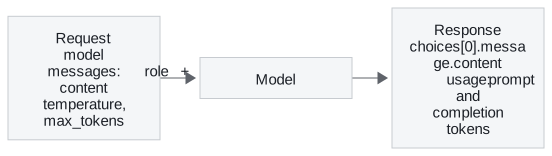
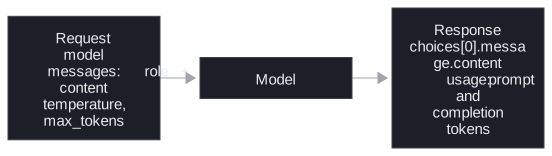
Four parts of the request and response matter on every call:
- Roles.
systemsets standing instructions,useris the question,assistantis an earlier reply. For the Larkspur generator the system message says to answer only from the handbook excerpts, and the user message holds the excerpts and the customer's question. - The call is stateless. The API remembers nothing between calls. A follow-up question works only if you send the earlier turns again, so every turn of a long conversation pays for all the turns before it.
- Sampling parameters.
temperaturecontrols randomness; the notebook uses 0.1 for repeatable answers.max_tokenscaps the reply; lesson 2 of T2.2's notebook sets 1,000. Reasoning models are stricter: T7.3's routing page records that o-series models reject a custom temperature. usage.prompt_tokensandcompletion_tokensare what the provider bills. In the installedopenai2.54.0,usage.completion_tokens_details.reasoning_tokensreports how many of the completion tokens were hidden reasoning. Lesson 3 of T2.2 is about that field.
The notebook reads the key with getpass and sets openai.api_key, the SDK's module-level client. Lessons 3 and 4 of T2.2 create OpenAI() instead, which reads OPENAI_API_KEY from the environment loaded from .env. Either way the key stays out of the code and out of the notebook's saved state.
The Responses API
The notebook uses Chat Completions, which OpenAI still supports. For new projects, OpenAI's migration guide recommends its newer Responses API. The same call in the Responses API, which the installed openai 2.54.0 supports:
from openai import OpenAI

client = OpenAI()  # reads OPENAI_API_KEY
response = client.responses.create(
    model=MODEL,  # a current model ID from the provider's models page, pinned
    instructions="Answer only from the handbook excerpts.",
    input=prompt,
    temperature=0.1,
)
response.output_text
| Chat Completions | Responses | |
|---|---|---|
| Send | messages, a list of role and content |
input, a string or a list of items; standing instructions go in instructions |
| Read the reply | response.choices[0].message.content |
response.output_text, the text items of output joined |
| Cap the reply | max_tokens |
max_output_tokens |
| Usage | prompt_tokens, completion_tokens |
input_tokens, output_tokens, with hidden reasoning in output_tokens_details.reasoning_tokens |
| Conversation state | You resend every turn | Resend every turn, or pass previous_response_id and OpenAI keeps the history |
| Stored by OpenAI | By default only on new accounts | By default; store=False turns it off |
Four differences change what you build:
previous_response_idstill bills the history. The earlier turns reach the model and are billed as input tokens, so a long conversation costs what it did under Chat Completions.- Instructions do not carry over. A call that uses
previous_response_idmust sendinstructionsagain; the previous response's instructions are dropped. - Storage is a data-handling choice. Responses are stored by default. For customer data under a retention policy, set
store=Falseand resend the history yourself. - Hosted tools need it. Web search, code execution and image generation run only on the Responses API; T7.1's hosted tools page compares them with client-side tools.
The model names in this module's notebooks (gpt-4o, gpt-4o-mini, o4-mini) were current when the notebooks were written, and the numbers on these pages were measured with them. OpenAI has released newer families since: in November 2026 its migration guide's examples use gpt-6-astra. For new code, take the ID from the provider's models page and prefer a dated snapshot to an alias, so the model behind your answers changes only when your code does.
Two SDKs, two shapes
The notebook calls Gemini through Google's google-generativeai package, and the two SDKs disagree on almost every part of the call:
| OpenAI | Gemini (google-generativeai) |
|
|---|---|---|
| Set the key | openai.api_key = key |
genai.configure(api_key=key) |
| Pick the model | model="gpt-4o" on each call |
genai.GenerativeModel("gemini-2.5-pro") |
| Send | messages, a list of role and content |
generate_content(prompt), a string |
| Read the reply | response.choices[0].message.content |
response.text |
The notebook hides the difference behind one function, get_completion(prompt, model), which branches on the model name. The rest of the code calls one function, so switching provider is a one-argument change. Two details of the notebook's version are worth fixing before you copy it:
- It fails quietly. Any model name other than exactly
"gpt-4o"or"gemini-2.5-pro"returns the string"LLM not configured! ..."as if it were an answer. A typo such as"gpt-4o-mini"prints that sentence where the model's reply should be. A wrapper you own should raise on a model it does not know. - The Gemini package is retired. The installed
google-generativeai0.8.6 describes itself as deprecated and legacy, with all support ended on November 30, 2025; its successor isgoogle-genai, which this repository also installs. The notebook's Gemini cells still show the shape of a second SDK, which is their point here.
LangChain (T4.1) is the general version of get_completion: one chat-model interface over many providers, so a RAG chain does not change when the generator does.
Run the notebooks
The code for this lesson is in these notebooks. Colab runs one in your browser: install the packages its first cell imports and set the API keys it reads. To run every notebook as written, clone the repository and use its uv environment.
| Notebook | GitHub | Colab |
|---|---|---|
| Using chatgpt or google gemini | Open on GitHub | Open in Colab |
Key Takeaways
- A chat completion is one stateless HTTP call: a model, a list of role and content messages, and a reply with
usage. Every turn resends the history, so long conversations cost more each turn. - Bill from
prompt_tokensandcompletion_tokens(input_tokensandoutput_tokensin the Responses API, which OpenAI recommends for new code), keep the API key in the environment, and set a lowtemperaturewhen you need repeatable answers. - Hide provider SDKs behind one function so switching model is a one-argument change, and make that function raise on a model it does not know instead of returning a placeholder string.
Check yourself
1. Why does each turn of a long chat conversation cost more than the turn before it?
The call is stateless: the API remembers nothing between calls. A follow-up works only if you send the earlier turns again in messages, so every turn pays for all the turns before it in prompt_tokens.
2. You call the notebook's get_completion with the model name gpt-4o-mini. What comes back, and what should a wrapper you own do instead?
The string "LLM not configured! ...", printed where the model's reply should be. The function branches only on exactly "gpt-4o" or "gemini-2.5-pro" and returns that sentence for anything else. Your own wrapper should raise on a model it does not know.
3. You are starting a new Gemini integration. Should you copy the notebook's google-generativeai calls?
No. The installed google-generativeai 0.8.6 describes itself as deprecated and legacy, with support ended on November 30, 2025; its successor is google-genai, which the repository also installs. The notebook's Gemini cells are there to show the shape of a second SDK, and one interface over both providers (get_completion here, LangChain in T4.1) keeps the rest of the code unchanged when you switch.