Customer-facing routing with sentiment and human escalation
- Source
- From the RAG & Agents Engineering course
- By
- Sourav Banerjee
- Last updated
- 9 Nov 2026
Tickets that need a person
What you'll learn
- Explain why escalation is checked before the topic, and why that order is the policy.
- Compare two escalation targets and what each handoff must carry.
- Diagnose a form loop that blocks a worker, and replace it with a pause that survives a restart.
- Choose escalation triggers by counting missed and needless escalations.
Lesson 1 of T9.3 sent every ticket to a knowledge base. That assumes the right reply is always a retrieved answer.
Two Larkspur tickets break the assumption. One customer writes, angrily, that they were billed twice; the billing knowledge base explains double charges perfectly, and the customer wants a person. Another writes, calmly, that their production server has been down for an hour. The technical knowledge base has a restart guide, and the customer needs the on-call engineer now.
A topic router sends both to retrieval and both get a polite handbook answer. The topic was right each time. The question of who should reply was never asked.
So this lesson adds four jobs in front of the topic route:
- Detect: decide whether a person should handle the ticket.
- Direct: pick which person, since an unhappy customer and an emergency need different teams.
- Hand off: pass what the person needs to start without asking again.
- Wait: pause the graph until the person or the customer responds, without tying anything up.
Human-in-the-loop escalation
Human-in-the-loop escalation means the graph hands a ticket to a person instead of answering it, based on a check that runs before retrieval. Both routers in this module classify sentiment as well as topic, and the routing function reads sentiment first: a Negative ticket goes to escalation, and only the rest are routed by category.
The order is the policy. A negative billing ticket never reaches the billing knowledge base, however well the router would have classified it. In the 01a notebook the escalation node returns a fixed apology and notifies nobody; it marks where a real handoff goes.
The optional clinic notebook builds that handoff for a clinic's support desk. It routes four departments (Billing, Appointments, Records, Insurance) and four sentiments, with a rule in the sentiment prompt that Distress applies "only when the customer is facing a health emergency":
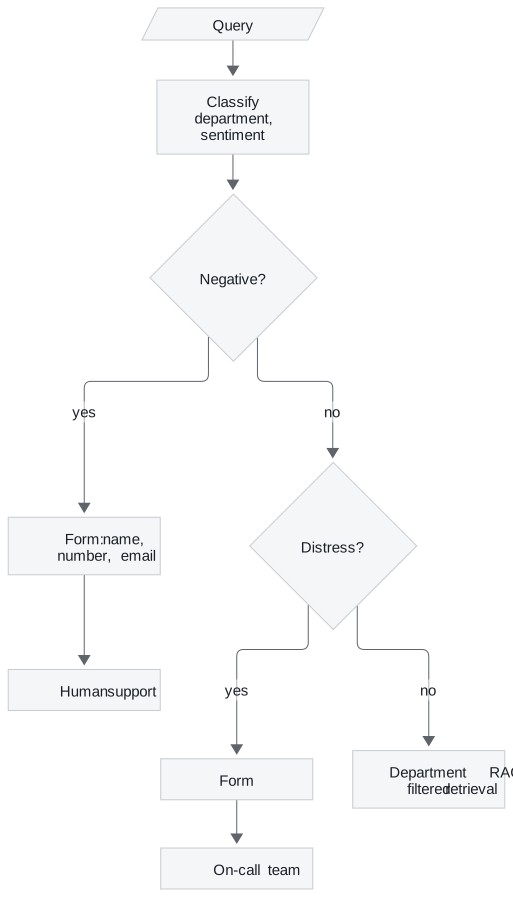
Figure 1: The clinic router. Two sentiment checks come before any department is searched.
Four tickets show how the checks resolve. The labels are what the prompts are written to produce; the run itself depends on the model:
| Ticket | Department | Sentiment | Where it goes |
|---|---|---|---|
| A complaint about a wrong bill | Billing | Negative | Human support form |
| Chest pain while waiting for an appointment | Appointments | Distress | On-call form |
| A request for test results | Records | Neutral | Records documents |
| A question about coverage | Insurance | Positive | Insurance documents |
Table 1: Four clinic tickets through the two checks (illustrative).
Two escalation targets
Negative goes to the support queue; Distress goes to on-call doctors. Each target gets its own form and its own message back to the customer. For Larkspur the same split separates an unhappy customer (support) from a production server down right now (the on-call engineer).
Each label maps to an explicit filter value
The clinic classifier returns Records, while the documents are stored under medical_records. Lowercasing the label, as in lesson 1 of T9.3, would produce records and match nothing. The department response node holds an explicit mapping instead:
| Label | Filter value | Department named in the prompt |
|---|---|---|
| Billing | billing |
Billing |
| Appointments | appointments |
Appointments |
| Records | medical_records |
Medical Records |
| Insurance | insurance |
Insurance |
Table 2: The clinic's label-to-filter mapping. Only the Records row would fail under lowercasing.
An explicit table is safer than lowercasing and hoping the strings agree, because a new label with no row fails loudly at the mapping step.
The handoff carries context
Each form writes what the person needs into the graph state, and the escalation node writes it into the reply:
| Target | Form fields | State key | Reply to the customer |
|---|---|---|---|
| Human support | Name, number, email | escalation_cust_info |
Someone will email, and call if needed |
| On-call team | Name, number | oncall_cust_info |
A doctor will call shortly |
Table 3: What each escalation path collects.
The emergency form asks for less, because the callback is the point. A production handoff should also pass the query, both labels and anything already retrieved, so the person does not start from zero.
Planted failure: the blocking form
The clinic notebook's form node displays Jupyter widgets and then loops, polling UI events with a 0.3-second sleep, until the Submit button sets a flag. The node holds the graph open the whole time. That works in a notebook. In a service it ties up a worker per waiting customer, and a restart loses every form in progress. We call this the blocking form.
Both notebooks already compile their graphs with a MemorySaver checkpointer and run each conversation under a thread_id. That is what LangGraph's interrupt() needs (T4.4). The node calls it with the form it wants filled, the graph saves its state and returns, and a later call on the same thread resumes with the form values:
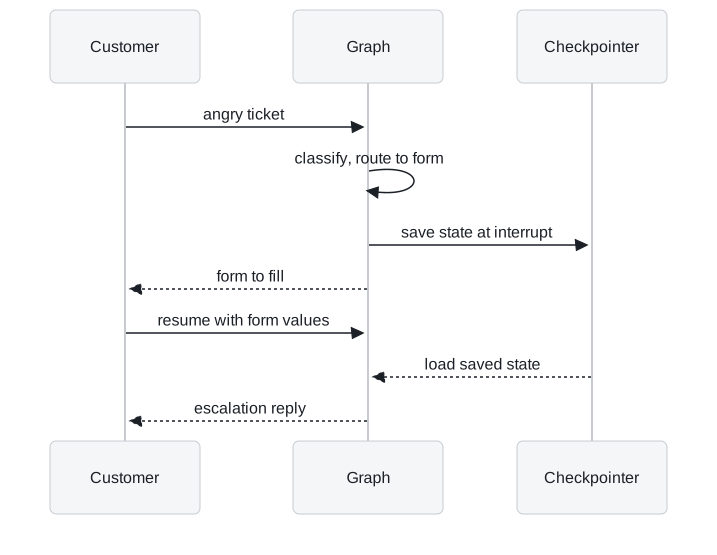
Figure 2: The interrupt pattern. Nothing waits in memory between the two calls.
With a persistent checkpointer in place of the in-memory one, the paused ticket survives a restart.
| Polling loop | interrupt() and resume |
|
|---|---|---|
| Worker held while waiting | ✓ | ✗ |
| Survives a restart | ✗ | ✓, with a persistent checkpointer |
| Works outside a notebook | ✗ | ✓ |
Needs a thread_id |
✗ | ✓ |
Table 4: Two ways to wait for a person.
Counting missed and needless escalations
Sentiment is a proxy for "a person should handle this". It misses a calm customer with an urgent problem and catches a sarcastic one with a simple question. Count both errors on labelled tickets before trusting it:
| Error | What it costs at Larkspur | How to see it |
|---|---|---|
| Missed escalation | A customer with a production outage gets a handbook answer | Tickets reopened or escalated by the customer after an automated answer |
| Needless escalation | An agent's time on a question the handbook answers | Escalated tickets an agent closes with a handbook link |
Table 5: The two escalation errors and where each shows up.
The two errors pull in opposite directions. A looser trigger cuts missed escalations and raises needless ones, so the threshold is a staffing decision as much as a model decision.
Triggers beside sentiment
Sentiment is one signal among several the graph already has:
- Sentiment: Negative or an emergency label, as in both notebooks.
- Fallback search: the router fell back to searching every knowledge base (lesson 1 of T9.3), so it was unsure of the topic.
- Rejected answer: the hallucination grader rejected the answer (lesson 3 of T9.3).
- Repeat: the same customer asked the same question twice.
Each extra trigger reduces missed escalations and adds some needless ones, which Table 5's counts will show.
In practice: the calm outage report
A Larkspur customer writes Our production server has been unreachable since 9am, can you look? Followed through a router built from this page:
- The sentiment check reads a polite message and returns Neutral. A Negative-only rule would send it on to the technical knowledge base.
- A Larkspur version of the clinic's Distress label, "a production service is down now", catches it and routes to the on-call engineer.
- The graph interrupts with a short form, name and callback number, and returns. No worker waits.
- The customer submits; the graph resumes on the same thread and passes the query, both labels and the contact details to on-call.
- If the first rule had missed it, the reopened ticket would count as a missed escalation in Table 5, and the label definition would be the thing to fix.
Next lesson: 30.3 routes between two sources instead of two audiences, and checks the evidence and the answer after retrieval.
Run the notebooks
The code for this lesson is in these notebooks. Colab runs one in your browser: install the packages its first cell imports and set the API keys it reads. To run every notebook as written, clone the repository and use its uv environment.
| Notebook | GitHub | Colab |
|---|---|---|
| Healthcare router agentic RAG (optional) | Open on GitHub | Open in Colab |
Key Takeaways
- Check escalation before topic so an angry or distressed customer reaches a person, not the knowledge base. Give each kind of escalation its own target, such as support for unhappy customers and on-call for live outages.
- Map each label to its filter value explicitly, and pass the query, both labels and anything retrieved with the handoff. Wait for the person with
interrupt()and a checkpointer, not a blocking form. - Sentiment is only a proxy for needing a person. Count missed and needless escalations on labelled tickets, and add triggers such as a fallback search, a rejected answer or a repeated question.
Check yourself
1. Why does the router check sentiment before it checks the topic?
The order is the policy. Checked first, a negative ticket goes to a person and never reaches the knowledge base, however well the router would have classified its topic. An angry customer wants a person, not a retrieved answer.
2. A calm Larkspur customer writes that their production server is down right now. Where should it go, and what risk does sentiment-only routing carry?
To the on-call engineer, the Larkspur equivalent of the clinic's Distress route. Sentiment misses a calm customer with an urgent problem, so this ticket may get a handbook answer: a missed escalation. Count it from tickets the customer reopens or escalates after an automated answer, and add triggers beside sentiment.
3. The clinic notebook's form node polls widgets in a loop until Submit is pressed. Why does that fail in a service, and what replaces it?
The node holds the graph open, so it ties up a worker per waiting customer, and a restart loses every form in progress. Use interrupt(): the node pauses with the form it needs, the state is saved under the thread_id, and a later call on the same thread resumes with the form values. With a persistent checkpointer the paused ticket survives a restart.