Prompts and resources
- Source
- From the RAG & Agents Engineering course
- By
- Sourav Banerjee
- Last updated
- 9 Nov 2026
Tools, resources, prompts
A Larkspur engineer may attach a handbook section, choose a reply template or let the model search. You will map those actions to resources, prompts and tools, then inspect what this host actually forwards to the model.
Step 1: Choose the primitive by who invokes it
A server can offer three kinds of thing. They differ in who decides to use them, and that decides which one a feature should be.
| Tool | Resource | Prompt | |
|---|---|---|---|
| FastMCP decorator | @mcp.tool() |
@mcp.resource("papers://folders") |
@mcp.prompt() |
| Listed with | tools/list |
resources/list, resources/templates/list |
prompts/list |
| Used with | tools/call |
resources/read |
prompts/get |
| In the lesson 7 chatbot, chosen by | the model | the user, typing @topic |
the user, typing /prompt name arg=value |
| Returns | content for the model | data the app shows or adds to context | messages to send to the model |
Step 2: Read a named resource or URI template
are read-only data, like GET endpoints in a REST API: they return data and should not change anything. Each has a URI the server chooses. A static URI names one thing (papers://folders, the list of topic folders); a template names a family (papers://{topic}, the papers saved under one topic), and the client fills in the parameter at read time.
Step 3: Fetch a server-owned instruction template
are templates the server owns. generate_search_prompt(topic, num_papers=5) returns a long instruction to search for papers on the topic and summarise them; FastMCP takes the prompt's name from the function and its arguments from the signature, and prompts/get returns the filled-in text as messages.
The Larkspur server offers one of each kind of resource and a prompt. Recorded with SDK 1.30.0:
resources/listreturned only the static resource,handbook://sections.resources/templates/listreturned the template,handbook://section/{chunk_id}.resources/readonhandbook://section/refund-timingreturned that chunk astext/plain.prompts/getforanswer_with_citationswithquestion = "How long does a refund take?"returned one message withrole: "user"whose text asks the model to callsearch_handbookand cite chunk ids.
Step 4: Trace the host command before generation
The lesson 7 chatbot routes user input before the model sees it:
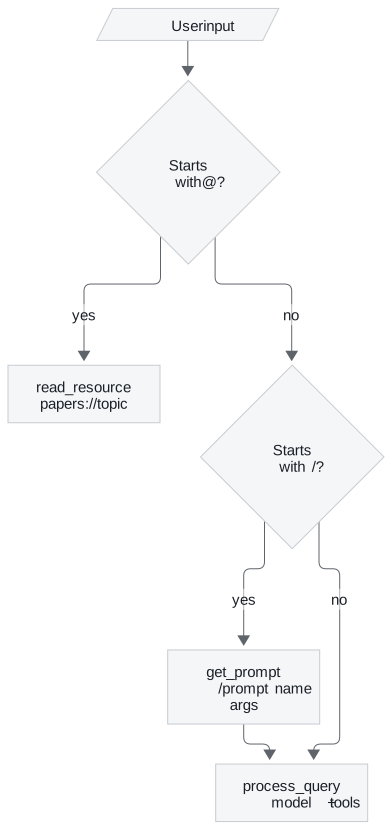
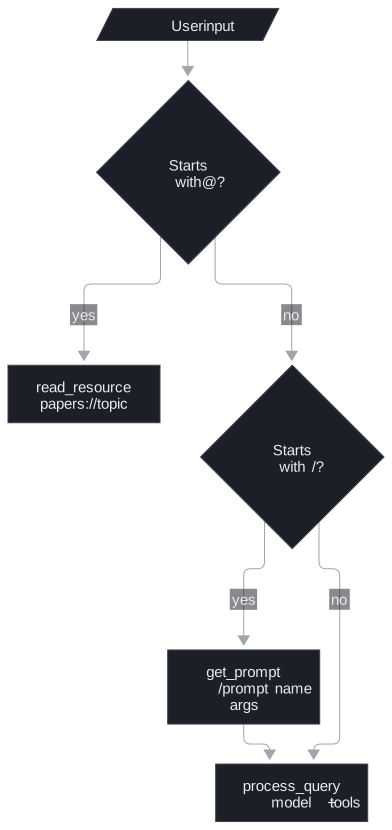
/prompts only prints the list. A prompt fetched with /prompt goes to process_query like a typed question. A resource is printed for the user and never reaches the model in this chatbot; another host could add it to the context instead. Two details in the chatbot's code are worth knowing before you copy it:
- It lists only static resources.
connect_to_servercallslist_resources(), which does not return templates, sopapers://{topic}never enters the routing table.get_resourceworks around it: for an unknownpapers://URI it uses any session that has apapers://resource. With two servers using that scheme it picks the first. - One dict routes all three kinds.
self.sessionsmaps tool names, prompt names and resource URIs to sessions, so a prompt named like another server's tool overwrites the route, the same collision the lab in lesson 4 of T12.1 shows for tools.
Step 5: Assign one concrete feature to each primitive
For Larkspur the split is: search_handbook is a tool, because the model needs it mid-answer with a query it writes; the sections are resources, for a support console that lets an engineer attach a section; and answer_with_citations is a prompt the engineer starts on purpose.
Try it yourself
List resources and resource templates separately, then read handbook://section/refund-timing. Check that listing static resources alone would not discover the template. Follow /prompt and a resource read through the host: identify which text enters process_query and which is only printed for the user.
Practice notebook
Run the complete implementation from the practice material after checking the trace or calculation above. Use its stated environment for live model or server calls; recorded model choices and timings are observations, not guaranteed outputs.
Continue learning
Run the notebooks
The code for this lesson is in these notebooks. Colab runs one in your browser: install the packages its first cell imports and set the API keys it reads. To run every notebook as written, clone the repository and use its uv environment.
| Notebook | GitHub | Colab |
|---|---|---|
| Adding prompt and resource features | Open on GitHub | Open in Colab |
Key Takeaways
- Choose the kind by who decides to use it. The model picks tools mid-answer; the user picks resources (read-only data by URI) and prompts (server-owned message templates).
- A static resource URI names one thing and a template such as
papers://{topic}names a family.list_resources()does not return templates, so list them separately. - Routing tools, prompts and resource URIs through one dict lets a name on one server overwrite a route on another.
Check yourself
1. What decides whether a server feature should be a tool, a resource or a prompt?
Who decides to use it. The model chooses a tool mid-answer through tools/call. The user chooses a resource, read-only data fetched with resources/read, and a prompt, a server-owned template fetched with prompts/get; in the lesson 7 chatbot that means typing @topic or /prompt name arg=value.
2. Why is search_handbook a tool on the Larkspur server, while the handbook sections are resources and answer_with_citations is a prompt?
The model needs search_handbook mid-answer with a query it writes, so it is a tool. The sections are data a support console lets an engineer attach (handbook://sections and the template handbook://section/{chunk_id}), so they are resources. answer_with_citations is something the engineer starts on purpose, so it is a prompt.
3. The lesson 7 chatbot never puts the papers topic template in its routing table. Why, and how does reading a topic still work?
connect_to_server calls list_resources(), which returns static resources but not templates, so papers://{topic} never enters the table. get_resource works around it: for an unknown papers:// URI it uses any session that has a papers:// resource. With two servers using that scheme, it picks the first.