From a tool-calling chatbot to MCP
- Source
- From the RAG & Agents Engineering course
- By
- Sourav Banerjee
- Last updated
- 9 Nov 2026
What moves out of the chatbot
Larkspur wants the same handbook tools available to a chatbot and a support console. You will identify the function, schema and dispatch entry currently copied into each host, then trace which pieces move behind an MCP server.
Step 1: Locate the three pieces of an embedded tool
The reference implementation builds the chatbot the rest of the module takes apart. It has two tools, search_papers (query arXiv and save the results to papers_info.json under a topic folder) and extract_info (look a paper up by id in those files), and every tool needs three things written by hand in the chatbot:
- The function that does the work.
- A schema in the
toolslist: a name, a description and aninput_schemathat the model reads to decide when and how to call it. - An entry in
mapping_tool_function, soexecute_toolcan turn the name the model picked back into a Python call and the result into a string.
Step 2: Follow a request through the existing tool loop
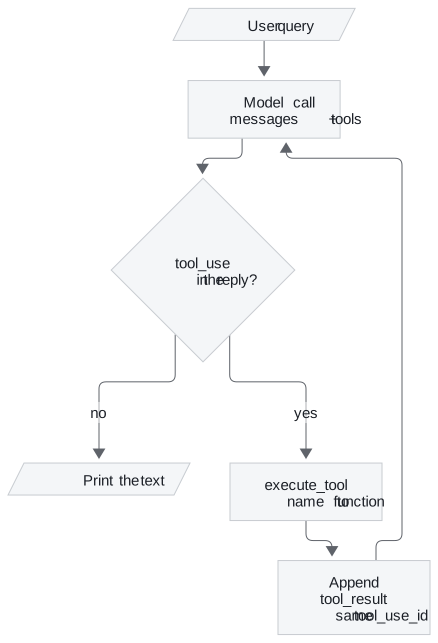
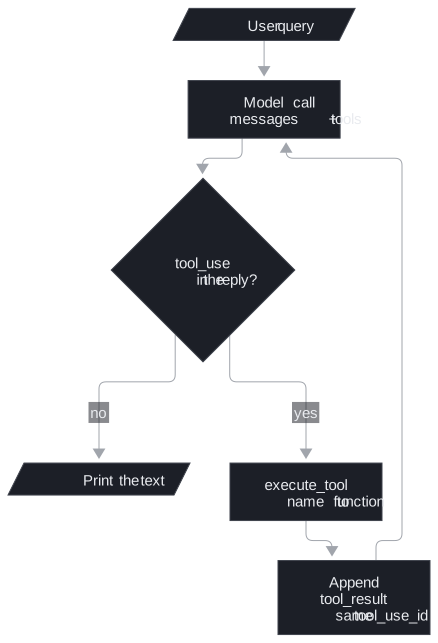
Around them sits the loop in process_query: send the question and the tools list to the model (claude-3-7-sonnet-20250219, max_tokens=2024), and while the reply contains a tool_use block, run the tool, append a tool_result with the same tool_use_id, and call the model again.
Step 3: Move execution and discovery behind the protocol
MCP keeps the loop and moves the rest. In the reference implementation the chatbot has no tools list and no mapping; both come from the server.
| Piece | 01a: inside the chatbot | 03a: with MCP |
|---|---|---|
| Tool functions | Defined in the application | In research_server.py, behind @mcp.tool() |
| Tool schemas | Written by hand in tools |
Fetched with session.list_tools() |
| Name to function | mapping_tool_function and execute_tool |
session.call_tool(name, arguments=...) |
| The loop and the model | process_query, chat_loop |
Unchanged, now methods of MCP_ChatBot |
Step 4: Check what a second host can reuse
The split pays off as soon as a second chatbot, an IDE or an agent framework wants the same tools: each of them speaks MCP to the same server instead of copying three pieces per tool. For Larkspur Cloud, the T5.1 retriever becomes one server, larkspur-handbook, and every assistant the support team builds connects to it.
The optional the reference implementation runs the same chatbot on OpenAI. Only the wrapper changes: each schema sits inside {"type": "function", "function": {...}} with parameters in place of input_schema, and the arguments arrive as a JSON string the code parses with json.loads. The tools and the loop are the same, which is why the server in lesson 2 of T12.1 can serve either provider.
Try it yourself
Add a hypothetical handbook search to the embedded chatbot and list the function, schema and mapping entry that change. Compare the MCP version: check that the host discovers the definition and calls through its session while the server owns execution. The model still requests work; MCP does not make the model execute functions.
Practice notebook
Run the complete implementation from the practice material after checking the trace or calculation above. Use its stated environment for live model or server calls; recorded model choices and timings are observations, not guaranteed outputs.
Run the notebooks
The code for this lesson is in these notebooks. Colab runs one in your browser: install the packages its first cell imports and set the API keys it reads. To run every notebook as written, clone the repository and use its uv environment.
| Notebook | GitHub | Colab |
|---|---|---|
| Chatbot example | Open on GitHub | Open in Colab |
| Chatbot example OpenAI walkthrough (optional) | Open on GitHub | Open in Colab |
Key Takeaways
- Without MCP, every tool needs three hand-written pieces in the chatbot: the function, its schema in
tools, and a name-to-function mapping. - MCP keeps the model loop unchanged and moves the tools to a server. The client fetches schemas with
session.list_tools()and runs them withsession.call_tool(). - Put a tool behind one server when a second chatbot, an IDE or an agent framework needs it, so each one connects instead of copying the code.
Check yourself
1. The model replies with a tool_use block. What must the 01a chatbot do before it calls the model again, and when does the loop stop?
It runs the tool through execute_tool, appends a tool_result with the same tool_use_id, and calls the model again with the messages and the tools list. The loop stops when a reply contains no tool_use block, and the chatbot prints the text. MCP keeps this loop unchanged.
2. You add a third tool to the 01a chatbot. Which three pieces do you write by hand, and where does each come from in the 03a version?
The function, its schema in the tools list, and an entry in mapping_tool_function. In 03a the function sits in research_server.py behind @mcp.tool(), the schema comes from session.list_tools(), and the call goes through session.call_tool(name, arguments=...). A second chatbot or an IDE then reuses the same server instead of copying all three.
3. Your Anthropic chatbot works, but the OpenAI port fails when it reads the tool arguments. What differs between the two providers?
Only the wrapper. In 01b each schema sits inside {"type": "function", "function": {...}} with parameters in place of input_schema, and the arguments arrive as a JSON string the code must parse with json.loads. The tools and the loop are the same, which is why one MCP server can serve either provider.