Deep agents: orchestrator, sub-agents, skills and long-term memory
- Source
- From the RAG & Agents Engineering course
- By
- Sourav Banerjee
- Last updated
- 9 Nov 2026
Deep-agent harness
What you'll learn
- Explain what a deep-agent harness gives one orchestrator model: files, sub-agents, skills, a backend and memory.
- Trace why a sub-agent's work stays out of the orchestrator's context.
- Diagnose a backend setting that sounds safer than it is.
- Separate conversation state from long-term memory, and spot a memory shared by every user.
Lesson 2 of T8.2 wired two agents into a graph node by node. This lesson starts from the other end, with a ready-made harness you configure instead of a graph you draw. The examples are two command-line scripts, 03a_simple_coding_agent.py and its long-term-memory variant 03b_long_term_memory_agent.py, plus the eight skill folders in 03c_skills.
Larkspur Cloud wants one assistant for its support engineers. It should research an outage on the web, draft a fix to a billing script, and remember that one engineer wants refund answers as a checklist. Built as a graph, that is a node per specialist, a router, a file store, a memory store and the edges between them. A deep agent is the shortcut: one orchestrator model inside a harness, a prebuilt set of tools and middleware that gives it files, sub-agents, skills, an execution backend and memory.
The scripts use the deepagents library's create_deep_agent. The tool and backend behaviour below is that of deepagents 0.7.32, the version in this course's lock file:
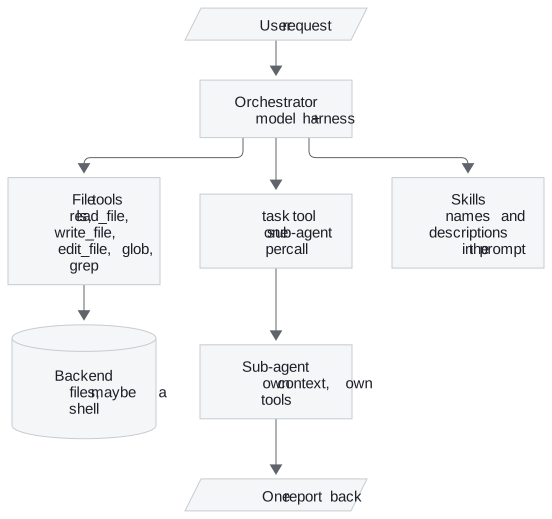
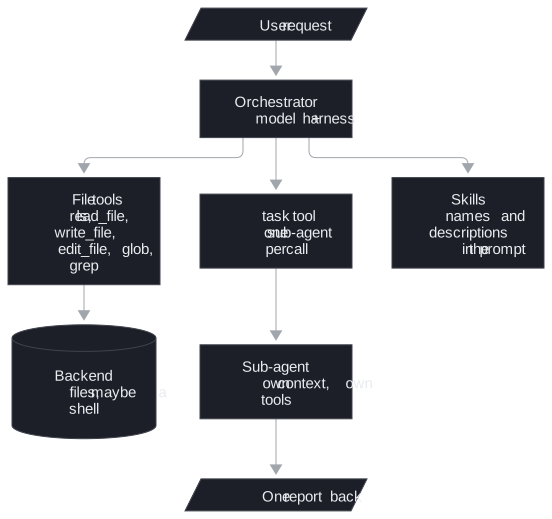
Figure 1: The harness around one orchestrator. You configure each box instead of drawing edges between them.
The scripts configure each part as follows:
| Part | What it gives the orchestrator | In the scripts |
|---|---|---|
| Built-in tools | File operations (ls, read_file, write_file, edit_file, glob, grep), execute for shell commands, and task to call a sub-agent |
Added by create_deep_agent. execute returns an error unless the backend can run commands |
| Custom tools | Domain actions | 03a: name_project, internet_search (Tavily, 5 results by default) and four tools over a managed text-to-SQL service for an insurer's customer, distribution, policy and claims data. 03b adds save_memory, recall_memories, forget_memory |
| Sub-agents | Specialists, each a dict of name, description, system_prompt, skills and tools |
03a: 7 (senior-developer, code-reviewer, research-agent and four insurer analytics agents). 03b adds memory-manager |
| Skills | Instructions in SKILL.md files under /skills/ |
8 skills, one per sub-agent. Each sub-agent's prompt says to follow its skill |
| Backend | Where files live and whether commands run | A CompositeBackend that routes /skills/ to the skills folder and everything else to FilesystemBackend(virtual_mode=True), or to LocalShellBackend when USE_SANDBOX=true |
| Checkpointer | Memory within one thread | MemorySaver, one thread_id per task |
| Model | The orchestrator's model | Claude Opus 4.6 on a model-serving endpoint, temperature 0.1 |
Table 1: The harness as the two scripts configure it.
Because the harness is a configuration, you audit it by reading the configuration. The next three sections take its parts one at a time.
Sub-agents keep context small
A call to task runs the named sub-agent with its own messages and tools, and only its final message returns to the orchestrator:
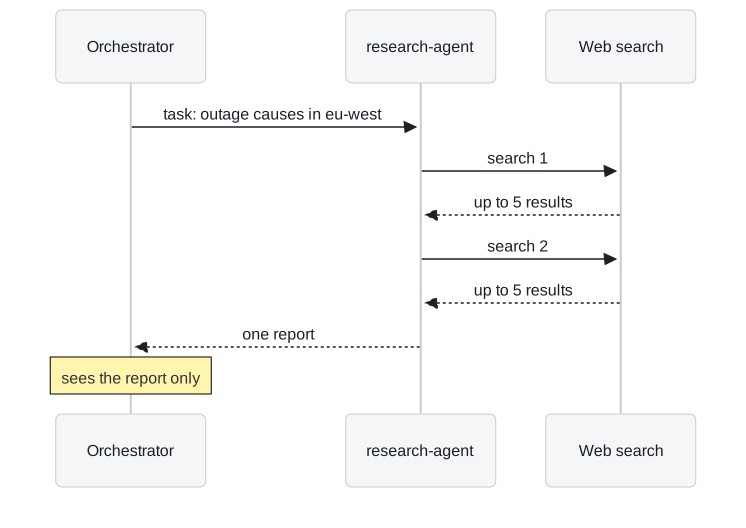
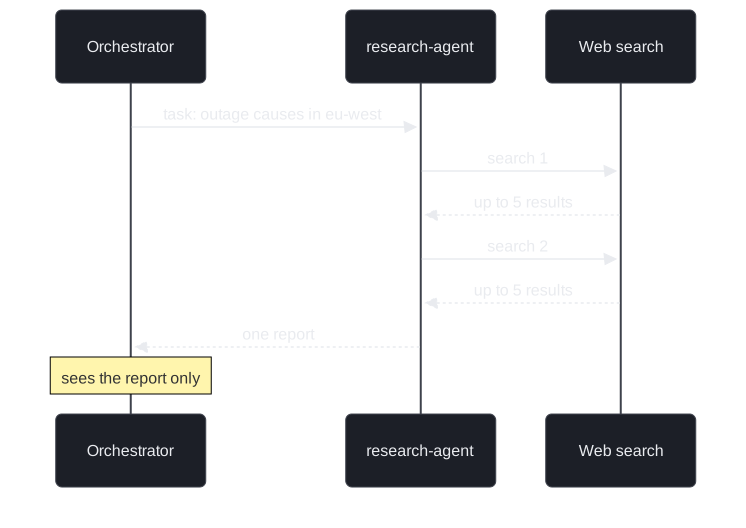
Figure 2: Delegation through task. The searches and the sub-agent's notes stay in its own context.
The research agent's search calls and its notes never enter the orchestrator's transcript. After a dozen searches the orchestrator holds the task it sent and one report. That is what lets a deep agent run long jobs without context creep, the slow growth of a transcript until the model loses the thread.
The trade is visibility. The orchestrator cannot check a claim against raw results it never saw. A sub-agent's report should name its sources.
Skills load only when a task needs them
A SKILL.md starts with YAML frontmatter holding a name and a description (the library caps the description at 1,024 characters). The harness puts only those two fields in the system prompt and tells the model to read_file the full instructions when a task matches the description. This is progressive disclosure: eight skills cost eight short lines until one is needed.
The memory-manager skill shows what the full body holds once read:
| Section | What it tells the sub-agent |
|---|---|
| Workflow | Assess the request, then save, recall or forget |
| Recall | Search broadly first with an empty query, then narrow by category or keyword |
| Categories | Five labels: preference, fact, decision, project, feedback |
| Forgetting | Confirm with the user before deleting, unless the request is unambiguous |
Table 2: The memory-manager skill body, read only when a memory task comes up.
Because the model matches a task against the description alone, a description that does not say when the skill applies is a skill that never loads. We call this a silent skill. Adding eight more skills is cheap in tokens, but each new description has to be distinct enough that the model picks the right one.
The backend decides what can run
The backend is where files live and whether a command can run at all. Two settings in the scripts look safer than they are:
| Setting | What it sounds like | What it does |
|---|---|---|
FilesystemBackend(virtual_mode=True) |
A sandbox | Anchors paths under the root folder and blocks traversal such as ... The library's docstring says it provides no sandboxing or process isolation |
USE_SANDBOX=true |
A LangSmith cloud sandbox, as the script's comment says | Selects LocalShellBackend, which the library documents as unrestricted shell execution on the host |
Neither, and execute called |
A shell | An error, because the backend cannot run commands |
Table 3: Three backend settings and what they really do.
We call the middle row sandbox by name: a flag whose name promises isolation the code does not provide. The library does ship a separate LangSmithSandbox backend, but the script never selects it.
The choice of backend follows from what the agent needs to run:
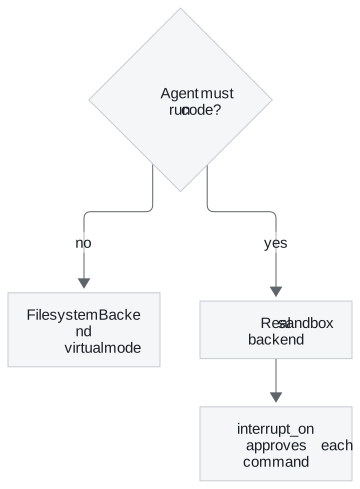
Figure 3: Choosing a backend. Code execution needs both a real sandbox and a person approving commands.
create_deep_agent takes interrupt_on to pause before chosen tools, which is how a person approves each execute call. Lesson 2 of T8.2's Python tool gives the same advice for its own runner, and T8.3 builds the approval step.
Three layers of memory
The memory variant keeps three layers apart:
| Layer | Scope | Store in 03b | Store in the deployed version |
|---|---|---|---|
| Conversation | One thread | MemorySaver checkpointer, lost on restart |
The same |
| Long-term | Every thread, every session | A JSON file, long_term_memories.json, under the key memories:<user id> |
A Delta table, agent_memories, with user_id, content, category and saved_at |
| Artifacts | Project files the developer agent writes | projects/ beside the script |
A governed storage volume |
Table 4: Thread state, long-term memory and artifacts.
The orchestrator's prompt tells it to recall memories at the start of each conversation and to save preferences, facts, decisions, project context and feedback as they come up. Running the script's own memory functions against a scratch file shows two limits the code carries:
| Call | Returned | Why |
|---|---|---|
| Engineer A saves "Prefers refund answers as a bulleted checklist" | Saved | |
| Engineer B recalls everything | Found 2 memories, A's included | CURRENT_USER_ID is fixed to default-user. Every user shares one namespace |
| Recall "refund" | Found 1 | The query is a substring of the stored text |
| Recall "bullet points" | No match | "bulleted" does not contain "bullet points". A paraphrase finds nothing |
| Forget "e" | Deleted the checklist note | The first memory containing the substring goes |
Table 5: The 03b memory tools on a scratch file, from our run.
The second row is a shared namespace, and in a multi-user deployment it leaks one engineer's notes into another's session. The user key has to come from authentication. The fourth row is the cost of substring search, and the script's comment names PostgresStore as the production replacement.
The module's deployed design, described in the deep agent overview, runs the same harness behind a FastAPI backend with Server-Sent Events, eight sub-agents and a recursion limit of 100.
In practice: Larkspur's support deep agent
- Delegate research. A
research-agentsub-agent searches outage reports, and the orchestrator reads one report per task. - Write a skill per specialist. A
billing-fixesskill's description says when it applies (changes to refund or proration scripts). The model loads it only for those tasks. - Pick the backend on purpose. The default is virtual-mode files with no execution. Running a billing test needs a real sandbox backend and
interrupt_onapproval for every command. - Key memory on the user. Each engineer's preferences live under their authenticated id, and recall uses search that tolerates a paraphrase.
Limits
- No recorded run. The scripts need a model-serving endpoint and a Tavily key. This page describes their configuration and the library's behaviour rather than a measured run.
- One library version. Tool names and backend behaviour are those of
deepagents0.7.32. Check them again after an upgrade.
Run the notebooks
The code for this lesson is in these notebooks. Colab runs one in your browser: install the packages its first cell imports and set the API keys it reads. To run every notebook as written, clone the repository and use its uv environment.
| Notebook | GitHub | Colab |
|---|---|---|
| Simple coding agent | Open on GitHub | Run locally |
| Long term memory agent (optional) | Open on GitHub | Run locally |
| Skills (optional) | Open on GitHub | Run locally |
Key Takeaways
- A deep agent is one orchestrator configured with file tools, sub-agents through
task, skills and a backend. Only a sub-agent's final message returns, which keeps the orchestrator's context small. - Skills put only their
nameanddescriptionin the prompt and are read in full when a task matches, so each description must say when its skill applies. - Audit the harness by its configuration.
FilesystemBackend(virtual_mode=True)blocks traversal without isolating anything,LocalShellBackendruns unrestricted shell on the host, and memory keyed to one fixed user id is shared by everyone.
Check yourself
1. How does a call to the task tool keep the research agent's searches out of the orchestrator's context?
The task tool runs the sub-agent with its own messages and tools, and only its final message returns to the orchestrator. The search calls and notes stay in the sub-agent's context, and the orchestrator reads only the report.
2. The harness loads eight skills from 03c_skills. What does the orchestrator's system prompt hold for them before any is needed?
Only each skill's name and description from the SKILL.md frontmatter, eight short lines in all. When a task matches a description, the model calls read_file for the full instructions. This is progressive disclosure.
3. A teammate sets USE_SANDBOX=true, believing the agent's commands now run in a cloud sandbox. Are they safe?
No. Despite the script's comment, the code selects LocalShellBackend, which the library documents as unrestricted shell execution on the host with no isolation. Code execution belongs in a real sandbox backend, with a person approving each command through interrupt_on.