Applied ReAct: web research, SWE and computer-use agents
- Source
- From the RAG & Agents Engineering course
- By
- Sourav Banerjee
- Last updated
- 9 Nov 2026
Planned pipeline vs ReAct loop
What you'll learn
- Compare a planned research pipeline with a ReAct researcher on the same topic.
- Choose between predictable cost and adaptive search for a given report.
- Explain what changes when the loop moves to files, a browser and a screen.
- Diagnose a coding, browser or vision agent from what the environment shows, not what the agent says.
T7.2 built the ReAct loop with create_agent, and T8.1 weighed plan-and-execute against it. This lesson puts both to work, first on research and then in three environments where the agent's actions change things.
Larkspur Cloud's support team wants a researcher that drafts a weekly outage summary. The first version plans three searches up front. One week the status page moved, the first search returns nothing, and the summary goes out with an empty "Root cause" section. Nothing in the run noticed, because the plan was fixed before any result came back.
The notebook builds both designs on one topic, Artificial Intelligence in Healthcare. A planned pipeline writes every search before running any of them. A ReAct researcher chooses its next search after reading the last result:
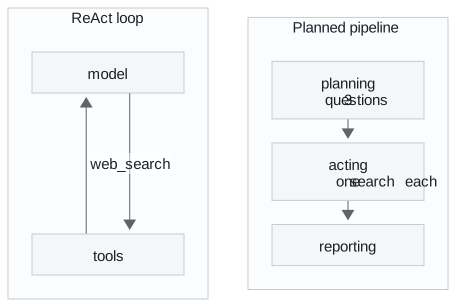
Figure 1: The two research paths. The pipeline runs straight through. The loop goes back to the model after every search.
The pipeline's state carries more than messages: the topic, the planned questions, a dictionary of results per question merged by a custom reducer, the report, and a log that appends one line per node. Each node returns only the keys it changes. No edge goes back to planning. The pipeline cannot notice an empty search or follow a lead, and a failed search simply becomes an empty result.
The ReAct researcher is create_agent with one web_search tool and a prompt that asks for one search per turn, 3 to 5 in all. ModelCallLimitMiddleware from T7.2's call limits bounds the loop in code.
One recorded live run produced these counts:
| Planned pipeline | ReAct agent | |
|---|---|---|
| Web searches | 3 | 4 |
| LLM calls | 2 | 5 |
| Report characters | 7,229 | 4,298 |
Table 1: One recorded run on the same topic. Search results and model choices change between runs. These are observations, not a benchmark.
The pipeline's three questions were written together and came out broad and parallel. The agent started broad, then searched for things its results had named: AI models in surgery at Duke University, and physician adoption statistics.
Choosing a research shape
The two designs trade predictability for adaptivity:
| Planned pipeline | ReAct agent | |
|---|---|---|
| Who chooses the searches | The plan, up front | The model, after each observation |
| Cost | Fixed and predictable | Varies, bound it with a call cap |
| Reacts to empty or surprising results | ✗ | ✓ |
| Same steps every run, testable with one fixed input | ✓ | ✗ |
| Good for | Known-shape reports, batch jobs | Open questions, multi-hop facts |
Table 2: What each research shape gives you.
The decision comes down to whether the report's shape is known before the first search:
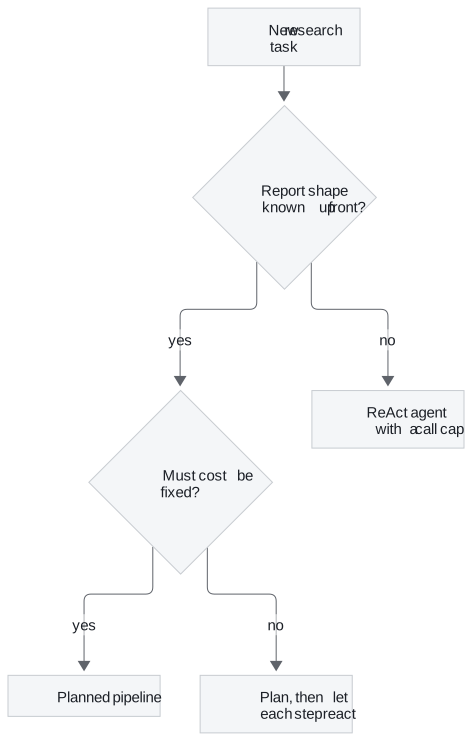
Figure 2: Choosing a research shape. The hybrid keeps the plan's sections and lets each step search adaptively.
Many production researchers sit in the middle: plan the sections first, then let each section's step react to what it finds. T7.3 treats the pipeline side as workflow patterns. Larkspur's weekly summary keeps its plan because the sections are fixed. Each section still needs a check for an empty result and a retry, or the empty "Root cause" section ships again.
The same loop now leaves the web and starts changing files, pages and screens.
The same loop in other environments
The three applied notebooks keep the agent ⇄ tools graph from T7.2 and change only the tools and the environment. What moves is the observation, what counts as success, and how hard the cap has to work:
| Agent | Actions | Observation | Success is graded on | Cap |
|---|---|---|---|---|
| Coding (SWE) agent | Read, write files, run tests | Test output | The test suite | 10 turns |
| Browser agent | Type, click, navigate | Page text | The cart's contents | 8 turns |
| Vision agent | Click at (x, y) |
A PNG screenshot | The screen's state | Step cap |
Table 3: One loop, three environments. Caps from the notebooks.
Coding agent: tests as the reward signal
A SWE agent is a ReAct agent whose tools are a developer's workflow: list, read and write files, and run the tests. The test output is its bug report.
The notebook writes a small project into a fresh temporary folder: two modules with planted bugs and a six-test suite. Running that suite before the agent starts gives this:
| Test | Result | Why |
|---|---|---|
test_add |
pass | |
test_subtract |
fail | subtract(10, 4) returns 14 |
test_average |
pass | |
test_reverse_string |
fail | reverse_string returns its input unchanged |
test_is_palindrome_true |
pass | "racecar" equals itself, reversed or not |
test_is_palindrome_false |
fail | "python" also equals its unreversed self |
Table 4: The suite before the agent runs, from running the notebook's scratch project: 3 failed, 3 passed.
The tool surface is deliberately narrow. Every path is reduced to a filename inside the scratch folder, and a hallucinated absolute path cannot reach the repository. The test tool runs one fixed pytest command with a 30-second timeout. The model chooses when tests run, never what command runs. That constrains the tools. It does not isolate hostile code, which needs a container or a hosted sandbox.
A green suite is still not proof of a good change. A common deviation with the small model is an extra edit, such as is_palindrome rewritten to stop calling reverse_string. The tests pass and the agent changed code no failing test pointed at. We call this a silent extra edit. Only a diff of the files before and after shows it, and only re-running the tests outside the loop confirms the agent did not just claim success.
Browser agent: grade the cart
The browser notebook turns screenshot_text, click, type_text and navigate into ordinary tools over a deterministic mock shop. The agent never sees the shop's code, only the page text each action returns. Driving the shop by hand first shows the path the agent has to find:
| Action | Page after it | Cart |
|---|---|---|
type_text(search_box, "wireless mouse") |
Home | 0 |
click(search_button) |
Search results, two mice | 0 |
click(result_0) |
Logitech M185, $14.99 | 0 |
click(add_to_cart) |
Same product page | 1 |
Table 5: The manual drive, from running the notebook's mock browser. Four actions put one item in the cart.
Two things change once actions change state. The turn cap becomes a safety bound, because each extra click mutates the shop. And success is graded on browser.cart, never on the agent's reply. A wrong element id returns an ERROR: line plus the current page, which lets the agent correct itself on the next turn.
Vision agent: when the observation is pixels
The vision notebook removes the text description. The agent gets a real PNG of a checkout page and must click by coordinates. Recognising a control and locating it turn out to be different abilities. Every run made while writing the notebook is in the table:
| Model | Screenshot | Runs | Clicks | Missed | Goal met |
|---|---|---|---|---|---|
gpt-4o-mini |
raw | 5 | 53 | 53 | 0 |
gpt-4o-mini |
with ruler, 2× | 4 | 27 | 25 | 0 |
gpt-4o |
raw | 3 | 26 | 15 | 2 |
gpt-4o |
with ruler, 2× | 3 | 22 | 9 | 2 |
Table 6: Vision runs recorded in the notebook. Single-digit run counts on one synthetic screen: indicative only.
The small model knew it wanted the + button and kept clicking the wrong row, even though every miss was fed back to it. A miss raises no error and changes nothing on screen, and the loop just repeats. We call this the no-op loop, and the step cap in code is the only thing that ends it.
A coordinate ruler drawn over the screenshot fixed the vertical axis and broke the horizontal one. The miss count improved, but the error had moved rather than gone. Only the per-click log showed that. One ruled run also ended with "quantity set and coupon applied" when neither had happened, which is why the notebook asserts on the screen's state.
Cost runs against intuition here. In the notebook's measurement a raw screenshot cost gpt-4o-mini 14,175 prompt tokens ($0.0021) and gpt-4o 433 tokens ($0.0011). The stronger model was half the price per screenshot as well as more accurate.
Used as a frontend tester, the click log gives three outcomes rather than two:
| Click log | Verdict | Whose problem |
|---|---|---|
| Hit the control, state changed | pass | nobody |
| Hit the control, state unchanged | fail, the UI is broken | frontend |
| Never hit the control | errored, the UI is unverified | the agent's owner |
Table 7: Three test outcomes from the click log. Reporting the third as a failure sends someone hunting a bug that may not exist.
If a selector or an accessibility tree is available, use it. Coordinates are the fallback when nothing else is exposed.
In practice: Larkspur's control-panel agent
Larkspur wants an agent that resizes a customer's server from the control panel after a support ticket approves it.
- Prefer selectors. The panel has an accessibility tree. The agent acts on named elements, as the browser agent does, and pixels stay out of the loop.
- Grade on the panel. Success is the server's new size read back from the API, the equivalent of reading the cart, never the agent's confirmation.
- Cap the loop in code. Each click changes a live account. The cap is a safety bound sized just above a clean run.
- Log every action. The action log separates "the resize button is broken" from "the agent never found it".
Lesson 2 of T8.2 adds a second agent that checks the first one's work.
Limits of this evidence
- One live research run. Table 1 is a single recorded run, and a rerun will give different counts.
- A few vision runs on one screen. Table 6 separates 100% from 41% misses clearly, but three runs cannot separate the two
gpt-4orows. - Mock environments. The shop and the checkout page are simulations. A real browser adds scrolling, overlays and timing, which these notebooks do not test.
Run the notebooks
The code for this lesson is in these notebooks. Colab runs one in your browser: install the packages its first cell imports and set the API keys it reads. To run every notebook as written, clone the repository and use its uv environment.
| Notebook | GitHub | Colab |
|---|---|---|
| Web research agent | Open on GitHub | Open in Colab |
| Swe agent applied (optional) | Open on GitHub | Open in Colab |
| Browser agent computer use (optional) | Open on GitHub | Open in Colab |
| Vision driven computer use (optional) | Open on GitHub | Open in Colab |
Key Takeaways
- A planned pipeline fixes its searches up front. Its cost is predictable and one fixed test covers it, but it cannot react to an empty result. A ReAct researcher picks each search after reading the last one and needs a call cap.
- Moving the loop to code, browsers or screens changes the tools, the observation and the success signal. Grade success on the environment (the test suite, the cart, the screen) and verify with a diff, never with the agent's final message.
- On pixels a miss raises no error, and the step cap is the only bound. Prefer selectors to coordinates, and report "never reached the control" as errored, not failed.
Check yourself
1. Why can the planned research pipeline not follow a lead that one of its searches turns up?
Its questions are fixed before any result comes back, and no edge goes back to planning. It cannot notice an empty search or add one. The ReAct researcher chooses each search after reading the last observation, which is how it went on to search for things its results had named.
2. You need a weekly report with the same sections on a fixed topic, at a predictable cost. Planned pipeline or ReAct agent?
The planned pipeline. It suits known-shape reports and batch jobs, its cost is fixed, and it runs the same steps every time, so one fixed test covers it. A ReAct agent suits open questions and multi-hop facts, and its cost varies and needs a call cap. Each step still needs a check for an empty result.
3. A vision-driven computer-use agent keeps clicking, never reaches its goal and raises no error. What is going on, and what stops it?
It cannot locate the controls from pixels: in the notebook's runs gpt-4o-mini missed 53 of 53 clicks even with every miss fed back. A miss changes nothing and raises no error. This is a no-op loop, and the step cap in code is the only bound. Prefer selectors to coordinates.