The same agent on a managed vector search index
- Source
- From the RAG & Agents Engineering course
- By
- Sourav Banerjee
- Last updated
- 13 Nov 2026
The project: the same agent on a managed vector search index
What you'll build
- A Delta table of chunks with a primary key, the source the index is built from.
- A Vector Search endpoint and index that embed the table's text for you and stay in sync with it.
- A retriever tool over that index that returns two chunks per call.
- Lesson 1 of T9.1's graph, unchanged: agent, retrieve, grade, rewrite, generate, with models served on the same platform.
Lesson 1 of T9.1 kept its chunks in an in-memory vector store that the notebook rebuilt on every run. Picture a Larkspur writer who corrects the refund-timing policy: with that store, nobody sees the fix until someone reruns the notebook. This project moves the retriever behind a managed vector search index. The graph, grader, rewrite and generate nodes stay the same. Only the tool points somewhere new.
What changes is who owns the index. The chunks live in a governed table, the platform computes the embeddings and serves the search, and the agent sees only a tool. The support writers update a table, and the assistant searches the latest handbook without anyone rebuilding a vector store.
Architecture
The pieces, from document to answer:


Figure 1: The managed retrieval path. The graph talks only to the tool, and the table and index sit behind it.
| Piece | What it does | Built on |
|---|---|---|
| Chunk table | One row per chunk with an integer id and its text, saved as a Delta table with change data feed on, so the index can see which rows changed | T5.1's load and chunk stages |
| Endpoint | The serving resource that hosts indexes and answers search requests | |
| Synced index | Built on the table's text column with an embedding model the platform calls for you; refreshed when a sync is triggered | T5.5's embeddings and T5.6's vector stores |
| Retriever tool | Wraps the index as a tool with a name, a description and a fixed number of results | Lesson 1 of T9.1's retriever tool |
| The graph | Agent, retrieve, edge grader, rewrite, generate, wired as in lesson 1 of T9.1 | Lesson 1 of T9.1 |
Table 1: The project's five pieces and the earlier lesson each one reuses.
Who computes the vectors
The platform offers three kinds of index, and the notebook uses the first:
| Index kind | Who embeds | How vectors arrive | Fits when |
|---|---|---|---|
| Managed embeddings | The platform, from a text column | Synced from the table | You want one model for chunks and queries with no embedding code |
| Self-managed embeddings | You, before writing the table | Synced from a vector column | You need a model the platform does not serve |
| Direct access | You | Written straight to the index, no table | Vectors come from another system and need no governed source |
Table 2: The three index kinds. Only the first keeps chunk and query embeddings on one model without your code.
Following one question
The notebook asks how the paper's authors set up the collaboration between the human and the LLMs. It travels lesson 1 of T9.1's graph, with the search now a call to the platform:
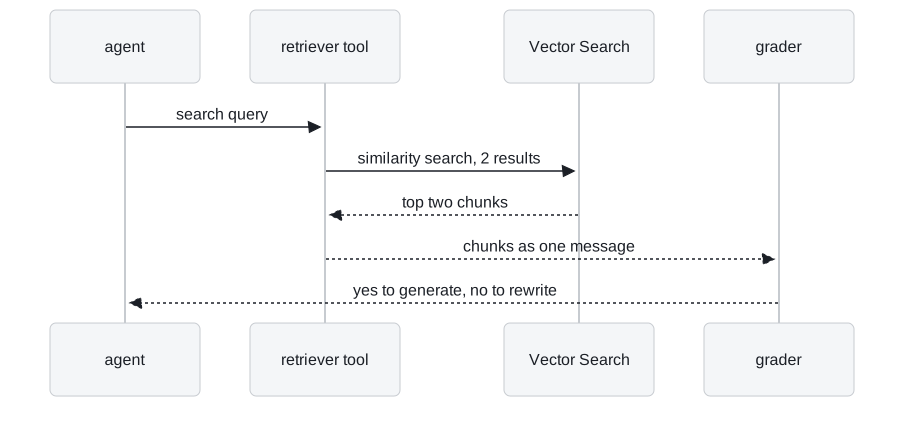
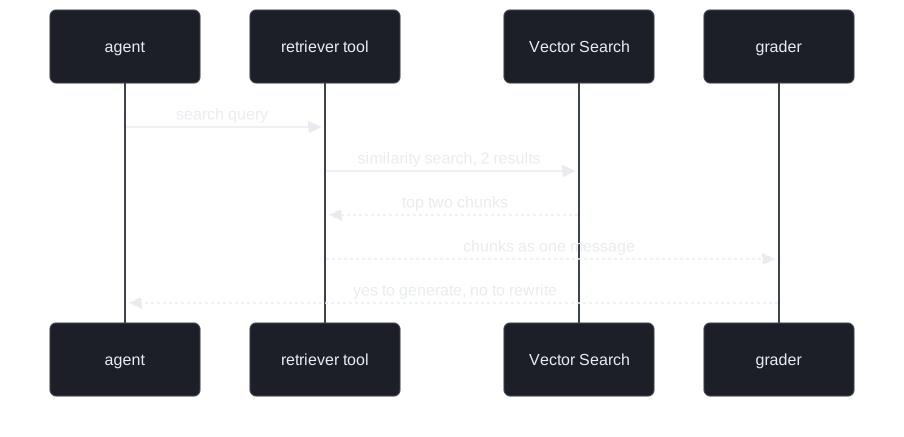
Figure 2: One retrieval. The platform embeds the query with the index's model, and the graph never sees a vector.
The answer depends on the served models, and the notebook prints no fixed result. The order of the steps is what stays the same. Before building the agent, the notebook queries the index directly once, a check that it answers before the graph depends on it.
Keep the index in step with the table
Added illustration. The notebook indexes a research paper. This walkthrough applies its sync settings to a hypothetical Larkspur edit, and shows when the agent first sees the new text:
Design choices worth copying
| Choice | Why |
|---|---|
| A table as the source of truth | Chunks are rows with ids, so an edit to one policy updates one row, and the index follows on the next sync |
| Change data feed on the table | The sync reads only the rows that changed instead of re-embedding the whole corpus |
| Managed embeddings | The same embedding model indexes the chunks and the queries, so they cannot drift apart. Lesson 1 of T9.1's notebook used the same model, computed by the notebook |
| Create only if missing, then wait | The setup waits until the endpoint and index report online, and a rerun neither fails nor duplicates them |
| A small, fixed result count | Two chunks per call keeps the grader's block small (lesson 1 of T9.1's block-grade risk) |
Table 3: Five choices and what each protects against.
The graph code did not change. That is the point of the tool boundary from T7.1: the model sees a name and a description, and the backend behind them can move.
Diagnose the managed setup
Added diagnosis guide. Each symptom points at a different piece:
| Symptom | Likely cause | Fix |
|---|---|---|
| Answers quote text a writer already corrected | No sync since the table edit | Trigger the sync from whatever writes the table |
| The model skips the tool, or calls it for the wrong questions | Tool name and description disagree | Name the tool for what it searches, and make the description agree |
| Relevant chunks go to rewrite | The exact-match "yes" label from lesson 1 of T9.1 |
Normalise or constrain the label, as in lesson 1 of T9.1 |
| A run fails at the rewrite node | Missing credentials for the second provider | Supply both providers' keys, or serve the rewrite model on the platform |
| A bill with no traffic | The endpoint is billed while it exists | Delete idle endpoints |
Table 4: Five symptoms of this project and where each comes from.
Limits
- A misleading tool name. The description talks about the paper, but the name refers to a company policy document. A name that contradicts the description can make the model skip the tool or call it for the wrong questions.
- Lesson 1 of T9.1's flaws come along. The grader still compares its label exactly with
"yes"(the capital-Y rewrite), still grades the block, and nothing counts rewrites. - Mixed providers. The rewrite node calls an OpenAI model while every other node uses a model served on the platform, so one run needs two providers' credentials.
- A triggered sync. A table edit is invisible to the agent until a sync runs. Whatever writes the table must also trigger the sync.
- Standing cost. The endpoint is billed while it exists, whether or not anyone asks a question.
- Illustration. The sync walkthrough is scripted on a hypothetical Larkspur edit. The notebook prints no sync timings.
The notebook runs only inside the platform's workspace, with permission to create a catalog, a schema and a vector search endpoint. The rewrite node also needs an OpenAI key, and the generate node pulls a public RAG prompt from LangSmith.
References
- LangGraph Graph API, accessed 13 November 2026. The nodes and conditional edges this project reuses unchanged from lesson 1 of T9.1.
Key Takeaways
- Behind the tool boundary the retriever can move from an in-memory store to a managed index without touching the graph: the model sees only the tool's name and description.
- A managed index makes the chunk table the source of truth. Turn on change data feed and trigger a sync after every write, or the agent searches yesterday's handbook.
- Moving platforms carries the graph's flaws with it. The exact-match label, the block grade and the missing rewrite counter need the same fixes as in lessons 1 and 3 of T9.1.
Check yourself
1. The project swaps an in-memory vector store for a managed vector search index. Which parts of lesson 1 of T9.1's graph had to change, and why so few?
Only the retriever tool: the agent, grader, rewrite and generate nodes are the same. The model knows the retriever only through the tool's name and description, and the store behind the tool can change without the graph noticing.
2. A Larkspur writer fixes the refund-timing row in the chunk table, but the assistant keeps quoting the old text an hour later. What is the likely cause?
The index uses a triggered sync, and it refreshes only when a sync is started. Until then it serves the embeddings of the old row. The pipeline that writes the table should trigger the sync, and change data feed lets that sync re-embed only the changed row.
3. The retriever tool is named for a policy document but described as a search over a research paper. What can go wrong, and what is the fix?
The model reads both strings to decide when to call the tool. A contradiction can make it skip the search for paper questions or call it for policy questions it cannot answer. Name the tool for what it actually searches, and make the description agree.