Multi-server MCP
- Source
- From the RAG & Agents Engineering course
- By
- Sourav Banerjee
- Last updated
- 9 Nov 2026
Multi-server
Larkspur has a healthy handbook server beside a status server that cannot start. You will merge uniquely named tools, compare all-or-nothing loading with partial availability and distinguish discovery failures from failures during a call.
Step 1: Flatten tools without losing their owner
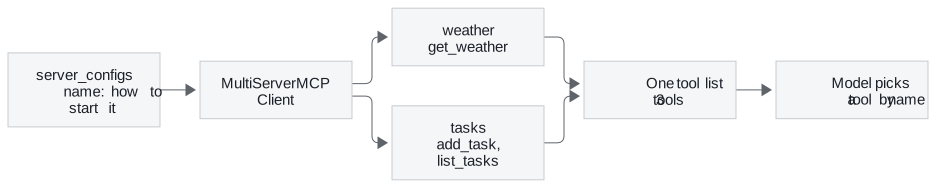
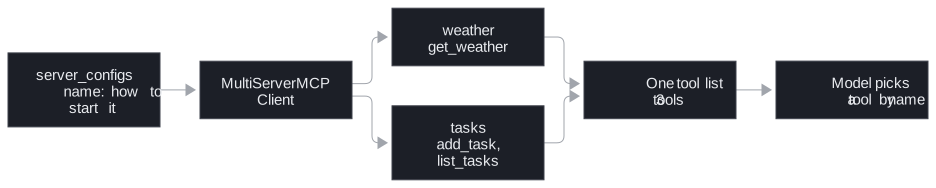
Project 03 puts the weather server next to a second one, a task server whose add_task and list_tasks tools keep a to-do list in tasks.txt. The client names both in one dict and hands it to MultiServerMCPClient from langchain-mcp-adapters:
Implementation excerpt from the configured application. The practice material supplies its models, data and session setup:
server_configs = {
    "weather": {"command": "python", "args": ["weather_server.py"], "transport": "stdio"},
    "tasks":   {"command": "python", "args": ["task_server.py"],    "transport": "stdio"},
}
client = MultiServerMCPClient(server_configs)
all_tools = await client.get_tools()   # one flat list: get_weather, add_task, list_tasks
The keys, weather and tasks, are the client's names for the servers. The model never sees them. It gets one list of tools, bound to the LLM with bind_tools, and a LangGraph ToolNode runs whichever one it picks. When the model calls add_task, the adapter sends the call to the server that listed it.
Step 2: Check uniqueness, state and prompt budget
Three rules follow from the flat list.
- Names must be unique across servers.
ToolNodeindexes tools in a dict by name (langgraph 1.2.18), so if two servers both offersearch, the one loaded last answers every call and nothing warns you.MultiServerMCPClient(..., tool_name_prefix=True)renames each tool<server>_<tool>, which givesweather_get_weatherandtasks_add_taskhere. Lesson 4 of T12.1 shows the same collision in a hand-written client. - Descriptions do the routing. The model chooses by name and description alone; server boundaries are invisible to it. For Larkspur,
search_handbooksays it searches the handbook's policies andsearch_statussays it searches live status pages, so Is there an outage right now? lands on the status server. If both said "search Larkspur information", the model would have to guess. - Every tool costs tokens on every call. All definitions from all servers go to the model each turn, as T12.1 measures. Connect the servers an agent needs, not every server you have.
Step 3: Compare the hand-built session registry
Project 02 under lesson 4 of T12.2 builds the same thing by hand: a config.json with an mcpServers block, one stdio_client and ClientSession per entry on an AsyncExitStack, and load_mcp_tools(session) for each. Its two servers run in Docker. The config.json entries start each one with docker run -i --rm …, where -i keeps standard input open so stdio works through the container, and the client starts a fresh container for every session. docker-compose up only needs to build the two images: the containers it also starts sit with their input open and are not the ones the client talks to. Replace the placeholder /ABSOLUTE/PATH/TO/… volume path in config.json with your own first; as shipped, it mounts a folder that does not exist.
The second server there is MCP's reference fetch server: one fetch tool that returns a page as Markdown, 5,000 characters at a time by default, with a start_index for the next slice, and a robots.txt check before it fetches on the model's behalf. It is the web-search half of the module's lab brief.
When one server fails
Step 1: Choose a deliberate partial-availability policy
Step 2: Test one unavailable server
get_tools() loads every server at once with asyncio.gather, so the first server that fails raises and no tools load at all. Recorded with a working handbook server and a status entry whose command does not exist:
await client.get_tools()raisedFileNotFoundErrorfor the status command, and returned nothing for the healthy handbook server.await client.get_tools(server_name="handbook")returnedsearch_handbook.
The hand-built client in project 02 wraps each server in its own try, prints Connection failed for <name>, and starts with the tools it got. Neither is right by default. A Larkspur assistant can answer refund questions with the status server down, so it should start degraded and say which tools are missing; an agent whose every task needs both servers should refuse to start. Load per server, record which ones failed, and put that list in the system prompt and the logs.
Step 3: Handle a call failure after successful discovery
Failures during a call are a separate case. A tool that raises comes back as isError: true, and the adapter returns it to the model as a ToolMessage with status="error" so the agent can try something else. A dead process or a dropped connection is not a tool error: the adapter raises, and the agent run stops unless your code catches it.
Try it yourself
Use the healthy handbook and missing status command. Compare get_tools() for all servers with get_tools(server_name=...) for the handbook only. Check whether healthy tools remain available, then explicitly choose a fail-open or fail-closed policy instead of silently dropping the required status capability.
Practice notebook
Run the complete implementation from the practice material after checking the trace or calculation above. Use its stated environment for live model or server calls; recorded model choices and timings are observations, not guaranteed outputs.
Continue learning
Run the notebooks
The code for this lesson is in these notebooks. Colab runs one in your browser: install the packages its first cell imports and set the API keys it reads. To run every notebook as written, clone the repository and use its uv environment.
| Notebook | GitHub | Colab |
|---|---|---|
| Multi server MCP | Open on GitHub | Run locally |
Key Takeaways
MultiServerMCPClientgives the model one flat tool list, so names must be unique across servers. Usetool_name_prefix=Truewhen they might clash.- The model routes by name and description alone. Write descriptions that say what each tool searches, and connect only the servers the agent needs.
get_tools()fails whole if one server fails. Load each server on its own, record which ones failed, and decide whether to start degraded or refuse.
Check yourself
1. Two servers behind one MultiServerMCPClient both offer a tool named search. What happens, and how do you prevent it?
ToolNode indexes tools in a dict by name (langgraph 1.2.18), so the server loaded last answers every search call and nothing warns you. MultiServerMCPClient(..., tool_name_prefix=True) renames each tool <server>_<tool>, such as weather_get_weather and tasks_add_task.
2. A Larkspur user asks whether there is an outage right now. What makes the model pick search_status over search_handbook?
The descriptions. The model chooses by name and description alone and cannot see server boundaries; search_status says it searches live status pages and search_handbook says it searches the handbook's policies. If both said "search Larkspur information", the model would have to guess.
3. The status server's command is missing, get_tools raises, and the Larkspur assistant starts with no tools at all. What should it do instead?
Load each server on its own with get_tools(server_name=...) and record which ones failed. get_tools() uses asyncio.gather, so one failure loses every server. The assistant can still answer refund questions, so it should start degraded and name the missing tools in the system prompt and the logs; an agent that needs both servers for every task should refuse to start.