A LangGraph agent over A2A
- Source
- From the RAG & Agents Engineering course
- By
- Sourav Banerjee
- Last updated
- 9 Nov 2026
Tasks & messages
Larkspur's handbook agent may finish immediately, stream progress or fail after beginning work. You will distinguish Message and Task replies, read task status separately from artifacts and inspect which event the SDK client treats as final.
Step 1: Choose the reply shape before parsing it
A2A has two reply shapes, and the executor decides which one a caller gets:
| Reply | When the executor produces it | Where the answer is | Can the client poll it? |
|---|---|---|---|
Message ("kind": "message") |
It enqueues one agent message and nothing else, as the echo agent in lesson 1 of T12.4 does | result.parts |
No: tasks/get answers -32001, Task not found |
Task ("kind": "task") |
It enqueues a Task, then status updates through a TaskUpdater, as the handbook agent does |
result.status.message, plus artifacts if the agent publishes any |
Yes, by its id, for as long as the task store keeps it |
A Message suits a one-shot answer. A Task suits anything that takes time, can fail halfway, or needs another turn from the caller.
Step 2: Separate terminal states from pauses
TaskState in 0.3.26 has nine values. The SDK treats four as terminal (completed, failed, canceled, rejected): TaskUpdater marks their update final and refuses any update after one, and tasks/cancel on a terminal task answers -32002. Two are interrupted states, where the task waits for the caller: input-required and auth-required. The caller continues such a task by sending a message with the same taskId; a message aimed at a terminal task gets error -32602 (the task is in terminal state), so a follow-up question starts a new task in the same contextId.
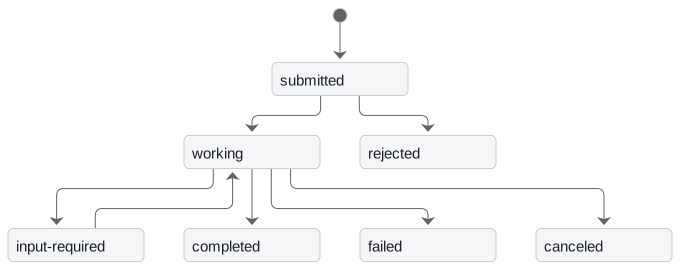
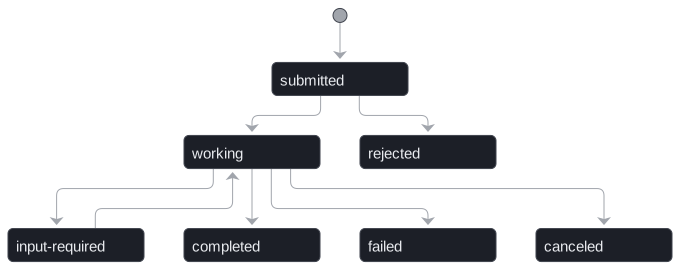
The diagram shows the paths these pages use; auth-required behaves like input-required, and unknown is the ninth value. The handbook agent's executor only ever walks submitted, working, then completed or failed.
Step 3: Read the recorded send and streaming exchanges
The interactive lab replays exchanges recorded from three agents served by a2a-sdk 0.3.26, each asked Can I export my data after I cancel my plan? The handbook agent has the handbook agent's executor, with a stub that returns a fixed handbook answer where the example calls the LangGraph graph. Its four calls:
message/sendreturns a Task in statecompleted.historyholds the user turn and the working update; the 185-character answer is instatus.message.message/streamreturns three server-sent events: ataskinsubmitted, astatus-updatetoworkingwith"final": false, and astatus-updatetocompletedwith"final": true.tasks/getreturns the same Task thatmessage/sendreturned.tasks/cancelreturns error -32002: the task cannot be cancelled in statecompleted.
Step 4: Inspect a task that fails after submission
The handbook agent's executor catches the exception, sets the task to failed with the error text, and then re-raises. The lab's third agent does the same with an index that is not loaded. A message/send caller gets JSON-RPC error -32603 whose message is the raw exception text, vector index not loaded, and no task id. A message/stream caller sees the task go to failed, and tasks/get with the streamed id returns the failed Task. An executor that sets failed and returns without re-raising gives the message/send caller a Task in state failed instead (checked against the same SDK), which the caller can handle like any other result, and the raw exception text stays out of a reply that may go to another team's agent.
The executor seam
Step 1: Trace what is enqueued at the protocol boundary
Step 2: Follow the executor boundary
The A2A server never sees LangGraph. It calls one method, AgentExecutor.execute(context, event_queue), and serialises whatever the method puts on the queue. The handbook agent's LangGraphAgentExecutor does five things:
- Reads the text with
context.get_user_input(). - Creates a Task with
new_task(context.message)if the request did not continue one, and enqueues it. - Publishes
workingthrough aTaskUpdater, with a short agent message. - Runs
graph.invoke({"messages": [("user", text)]})inasyncio.to_thread, sinceinvokeblocks and the server's event loop must stay free. - Publishes
completedwith the last message's content, orfailedon an exception.
cancel() raises ServerError(error=UnsupportedOperationError()), which reaches the caller as error -32004. The two-hop example's executors use await agent.ainvoke(...) instead of a thread; either keeps the loop free.
Step 3: Distinguish task-event streaming from model tokens
The card advertises two skills, calculator and lookup, one per tool of the ReAct agent, and streaming=True. Streaming here means task events: the graph's invoke returns once, so a stream carries the three events in the lab and no partial tokens. To stream tokens, the executor would iterate the graph's own stream and publish each chunk as an artifact update or a working message.
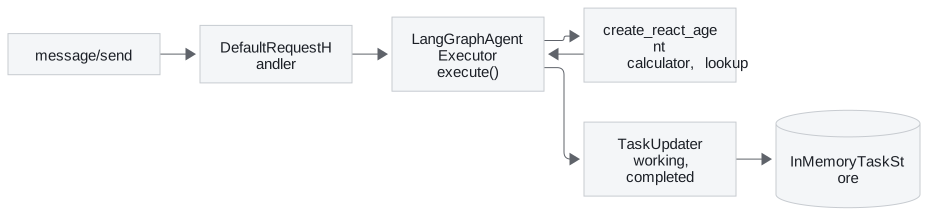
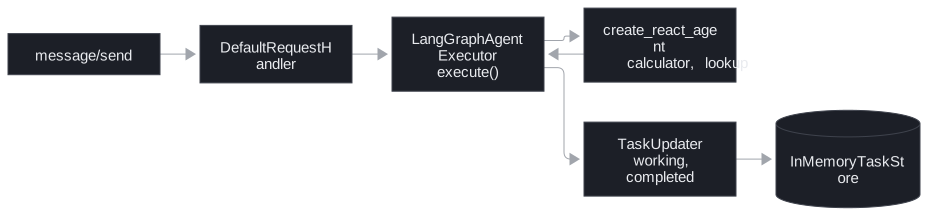
The example builds the graph with langgraph.prebuilt.create_react_agent. The installed langgraph 1.2.18 marks it deprecated in favour of langchain.agents.create_agent (T7.2); it still runs, and the executor would wrap either one the same way.
Try it yourself
In the lab compare a direct Message with a completed Task for the export question. Locate the answer in each shape, then run the failing agent. Check the task-state event and the resulting JSON-RPC error separately. Seeing a failed update in the event stream does not guarantee the high-level client returns it normally.
Practice notebook
Run the complete implementation from the practice material after checking the trace or calculation above. Use its stated environment for live model or server calls; recorded model choices and timings are observations, not guaranteed outputs.
Continue learning
- T7.2.
Run the notebooks
The code for this lesson is in these notebooks. Colab runs one in your browser: install the packages its first cell imports and set the API keys it reads. To run every notebook as written, clone the repository and use its uv environment.
| Notebook | GitHub | Colab |
|---|---|---|
| LangGraph agent over A2A | Open on GitHub | Open in Colab |
Key Takeaways
- Reply with a Message for a one-shot answer and a Task for work that takes time, can fail or needs another turn. Only a Task can be polled.
- Terminal states accept no further updates or messages. Continue a task only from
input-requiredorauth-required; otherwise start a new task in the samecontextId. - The server only calls
AgentExecutor.execute(). Keep blocking graph calls off the event loop, and on failure setfailedand return instead of re-raising raw exception text.
Check yourself
1. When should an A2A executor reply with a Task rather than a Message?
When the work takes time, can fail halfway, or needs another turn from the caller. A Task can be polled by its id for as long as the task store keeps it, and it moves through states; a Message suits a one-shot answer, and tasks/get on it answers -32001.
2. After the handbook agent's task reaches completed, the caller wants to ask a follow-up. Can it send the message with the same taskId?
No. completed is terminal, and a message aimed at a terminal task gets error -32602, so the follow-up starts a new task in the same contextId. Only a task in an interrupted state, input-required or auth-required, continues with the same taskId.
3. With the index not loaded, a message/send caller gets error -32603 carrying the raw exception text and no task id. What causes this, and what is better?
The handbook agent's executor sets the task to failed and then re-raises, which turns the failure into a JSON-RPC error. Set failed and return without re-raising: the caller gets a Task in state failed, handles it like any other result, and the raw exception text stays out of a reply that may go to another team's agent.